A website can look flawless and still be a small minefield for anyone navigating by keyboard, filling in a form or trying to understand an error. Vercel’s Web Design Guidelines audits interface code against more than 100 accessibility, performance and UX rules, but it does not design for you or automatically turn a mediocre website into a good one.

TL;DR: The No-Nonsense Summary
- What it is: a Vercel skill that reviews interface code against more than 100 accessibility, performance and UX rules.
- What it detects: accessibility, form, focus, animation, image, navigation, internationalisation and other UX issues.
- What it requires: an agent that can review interface code.
- The key limitation: auditing rules is not the same as creating a visual identity, nor does it alone certify legal or WCAG compliance.
In this article
| What it is | A skill that audits your web interface against more than 100 design, accessibility and UX rules. |
|---|---|
| Official website | https://skills.sh/vercel-labs/agent-skills |
| Repository | repo |
| Licence | MIT |
| Price | open source |
| Alternative to | manual UI review with an accessibility and UX checklist |
| GitHub stars | 31,434 |
| Launch year | 2025 |
| Maintained by | vercel-labs (organisation) |
Reviewed on 2026-09-25
This tool is included in these collections: Design skills for Claude Code and Codex · Skills for Claude Code, Codex and Coding Agents by Task
The Problem It Solves
Vercel’s Web Design Guidelines finds defects that a purely visual review often misses. It includes more than 100 rules covering semantic HTML, ARIA labels, keyboard navigation, focus states, forms, animations, typography, images, performance, dark mode and internationalisation. It certainly does not stop at checking whether the button looks nice.

Put plainly: you show an agent your website’s code and it looks for things that work badly even when the screenshot looks lovely. A button without an accessible name, a form that explains its errors poorly or an animation that ignores prefers-reduced-motion rarely comes up in the meeting where everyone is admiring the gradient. But users still have to deal with them.
Quick facts
- Maintainer: vercel-labs.
- Format: open skill for coding agents.
- Declared licence: MIT in the README.
- Repository: the stars shown on GitHub apply to the entire repository, NOT to users or installations of this skill.
- Price: open source; any cost for the agent or subscription you use is separate.
It works especially well as a complement to design skills for AI agents. One skill can help you build, then this one can come in afterwards with a torch, a checklist and very little patience.
Getting Started
The documented installation uses the Skills CLI. The official package repository gives the command npx skills add vercel-labs/agent-skills. That command adds the whole collection.
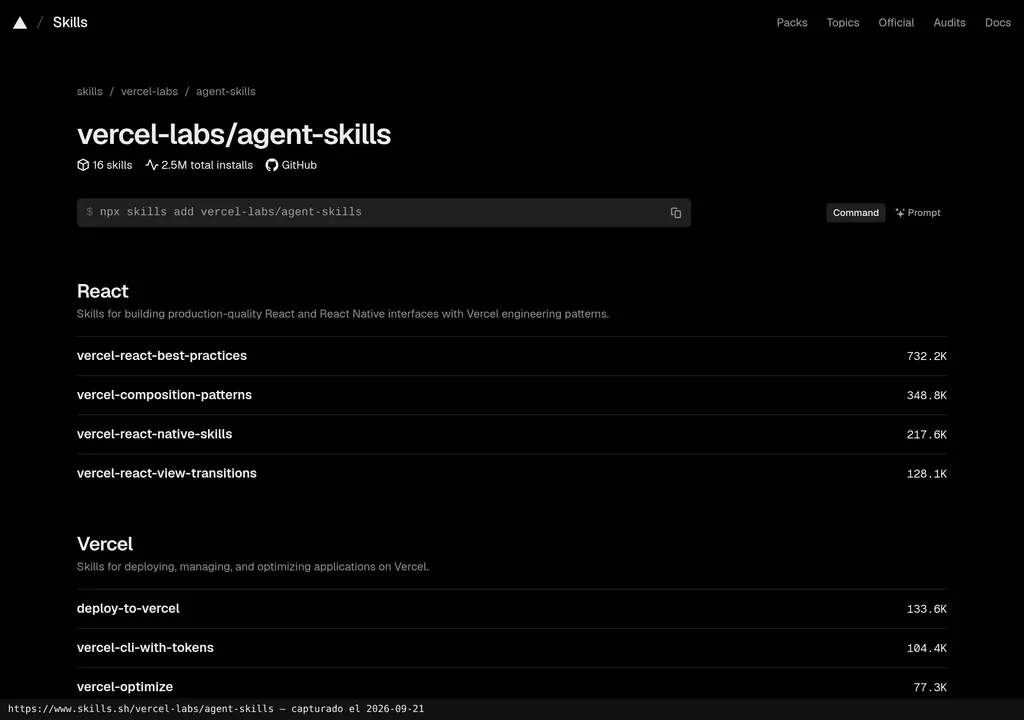
The public package page includes web-design-guidelines. Once the collection is installed, you can ask the agent to review the interface, accessibility, design or UX.
The documentation reviewed does not explain how to uninstall this skill alone. My advice? Check the help for the version of the CLI you have installed before manually changing folders. Making up a deletion command feels brave right up until something you needed disappears.
Copy this and paste it into Claude Code, Cursor or your favourite coding assistant:
Install web-design-guidelines from https://github.com/vercel-labs/agent-skills.
Audit the project’s pages and components, stating the rule, file, line and proposed fix.
Do not change code yet: first provide a prioritised report and flag anything you could not verify.
The installation is documented. Any configuration and testing the assistant can carry out afterwards will depend on the assistant and its access to the project.
MCP for Web Design Guidelines de Vercel
The reviewed dossier does not show any official MCP integration. What is documented is a skill installed through the CLI, with no MCP server of its own, credentials or separate connection process.
That matters because the two are confused far too often. A skill provides instructions to an agent; MCP connects the agent to external tools or data through a protocol. Here, what is documented is an interface-code review. Calling it MCP because it sounds modern would be selling something else.
Using It in Real Marketing
Where does it make sense for an agency or small team? Auditing a landing page before sending it into campaigns. The documented rules cover forms, focus, images, touch interaction, navigation and URL state.
My take is that its value lies in turning a vague “give it a look” review into a systematic audit against documented rules. It also forces a separation between two conversations that are often muddled together: whether the page has visual judgement and whether it is well executed in use. The first needs art direction. The second allows for far more verifiable rules.
Dani has not run a reproducible test, and the dossier does not include a comparative protocol either. So we can establish what it reviews, how it is installed and which categories it covers. Promising that it will find every issue or improve conversions would be crystal-ball territory. There are no metrics to support that kind of leap.
What They Do Not Tell You
Vercel’s Web Design Guidelines does not generate a visual identity. It can detect a bad coding practice and still leave you with a website that is correct, accessible and rather bland. Auditing does not mean creative direction. It seems obvious, but it is worth stating plainly.
Nor does it certify legal compliance or WCAG conformance on its own. Its checks can help identify issues, but an automated rule list does not replace testing with a keyboard, screen readers, different devices and specialist human review.
There is another condition: the agent needs to review the right code. If it analyses half the project, the conclusion starts out incomplete. The report should make clear what it inspected and what was left out. Without that boundary, a detailed result can inspire more confidence than it should.
The verified dossier does not include public opinions we can use. Talking about consensus, satisfaction or widespread adoption would be made up. Official promotion explains what the skill aims to do, but it does not prove how it behaves in every project.
Alternatives
The verified alternative is a manual UI review with an accessibility and UX checklist. It takes more time and requires technical judgement. In return, it can test complete journeys, assistive technology, ambiguous messaging and business decisions that an isolated rule will not even notice.
These are not mutually exclusive routes. I would use the skill to sweep through the code and reserve human review for validating findings, moving through the interface and setting priorities. If the real problem is creating the design, I would first look at resources focused on building and visual direction, such as Anthropic’s Frontend Design. To understand where it fits in the ecosystem, see the guide to skills for Claude Code, Codex and other agents.
Verdict
I recommend Vercel’s Web Design Guidelines for teams that already have an interface and want to put it through a systematic review before publishing or iterating on it. It is specific, open and covers many of the areas where attractive design plays dumb.
I would not use it as a replacement for a designer, a legal accessibility audit or testing with people. Its place is in the middle of the process: after building, before signing off. A website can look good and still fail in use. This skill helps uncover where. The judgement needed to fix it is still yours.