You set up a quality guard for your AI pipeline. The order is clear: if a cheap model generates the content, stop it before it goes live. And the guard does its job. Several times over two weeks, it throws out perfectly good work from your expensive model. The reason? Claude Code uses Haiku internally to name the session, and your guard can’t tell that internal call apart from the real work.
The killer calling the cops. Welcome to running LLMs in production.

TL;DR: The No-Nonsense Summary
- Ghost Haiku: Claude Code runs internal Haiku calls for auxiliary tasks (session naming, routing) that show up in
.modelUsagealongside your real work. Your guard mistakes them for the model that actually did the job. - Three heuristics, three failures: first model alphabetically, highest token count, and exact ID match all fail for the same reason: internal model calls mixed in with real work.
- The
--modelflag doesn’t work: inclaude -pheadless mode, only theANTHROPIC_MODELenv variable is respected. Without setting it explicitly, the CLI may use a stale default or silently downgrade to Haiku. - Robust fix: exclude Haiku from
.modelUsage, then pick the highest-output-token model from what’s left. Only if everything is Haiku is it a real downgrade.
What Claude Code Does with Haiku When You’re Not Looking
Claude Code in headless mode (claude -p) mixes internal models with your requested model in the same session: it runs Haiku calls for auxiliary tasks (session naming, routing) that you never asked for and don’t need. Those turns show up in the .modelUsage field and in the transcript ALONGSIDE your real work, with nothing to distinguish them.
And know what that means? Any logic that checks which model responded, without filtering out those internal calls, will get it wrong. Not sometimes. ALWAYS.
There’s more. In claude -p, the --model flag is ignored. Only the ANTHROPIC_MODEL environment variable works. If you don’t set it explicitly, the CLI picks a default that may be stale. And if your Max plan is close to its usage limit, Claude Code silently downgrades to Haiku. No warning. No error. is_error: false.
At Marketing Ultra we discovered this on June 14 while debugging our AI content pipeline. What came after was worse.
Three Broken Heuristics, Three Ways to Get Bitten
We tried three methods to detect which model had actually responded. All three bit us.
keys[0]: first model in alphabetical order. “Haiku” comes before “Opus” in the alphabet. Our heartbeat used this method. Result: it reported Haiku 24/7 for roughly 14 days. Our entire model history log, contaminated. Fourteen days of false data we didn’t catch because the pipeline was working fine. Only the record was a lie.
sort_by(-outputTokens)[0]: the model with the most output tokens. Looks like the smart method, right? The one generating the most must be the one that did the work. Until Opus returns a short answer and the Haiku-generated title has more tokens than the real response. The log says Haiku. The work is Opus.
Exact key match against a known ID. Model IDs carry an embedded date: claude-opus-4-6-20250401. Our guard compared against claude-opus-4-6 alone. No match. Exit 75: “model downgraded.” Perfect Opus work, thrown out. Several times.
Three “obvious” heuristics. Three ways to get bitten. All from the same underlying failure: assuming .modelUsage only reflects YOUR work.
The Misdiagnosis That Cost Us 697 Seconds of Opus
June 19. The guard is on version 3. It reads the transcript directly. Problem solved.
Sure about that?
The guard grabbed the LAST assistant turn using tail -1. And the last turn was the title Haiku generates. The SEO Strategist had just produced a complete strategy with Opus. 697 seconds of compute. The guard looks at the transcript, sees Haiku at the end, flags model_downgraded.
Eleven minutes of expensive model. Gone.
But here’s what really pisses me off. I pull up the error log looking for a pattern. I find old entries with model_downgraded and a hint: “Max usage limit.” I read the error message. I assume it’s the Max plan quota running close to the cap. Makes sense, right?
Wrong. Dani caught it by reviewing the timeline: the dates didn’t line up. Those entries weren’t real downgrades. They were false positives from earlier heuristics that had left garbage in the log. The “Max usage limit” hint was hardcoded as the default message when the guard couldn’t determine the cause.
I read the error message instead of verifying the original transcript. And that led me to “fix” something that wasn’t broken, while ignoring what actually was.
And this applies to EVERYTHING, not just AI: a log that says “quota exhausted” doesn’t mean the quota is exhausted. It means something wrote “quota exhausted” to the log. Verify the source data, not the derived message. ALWAYS.
How to Know Which Model Actually Did the Work in Claude Code

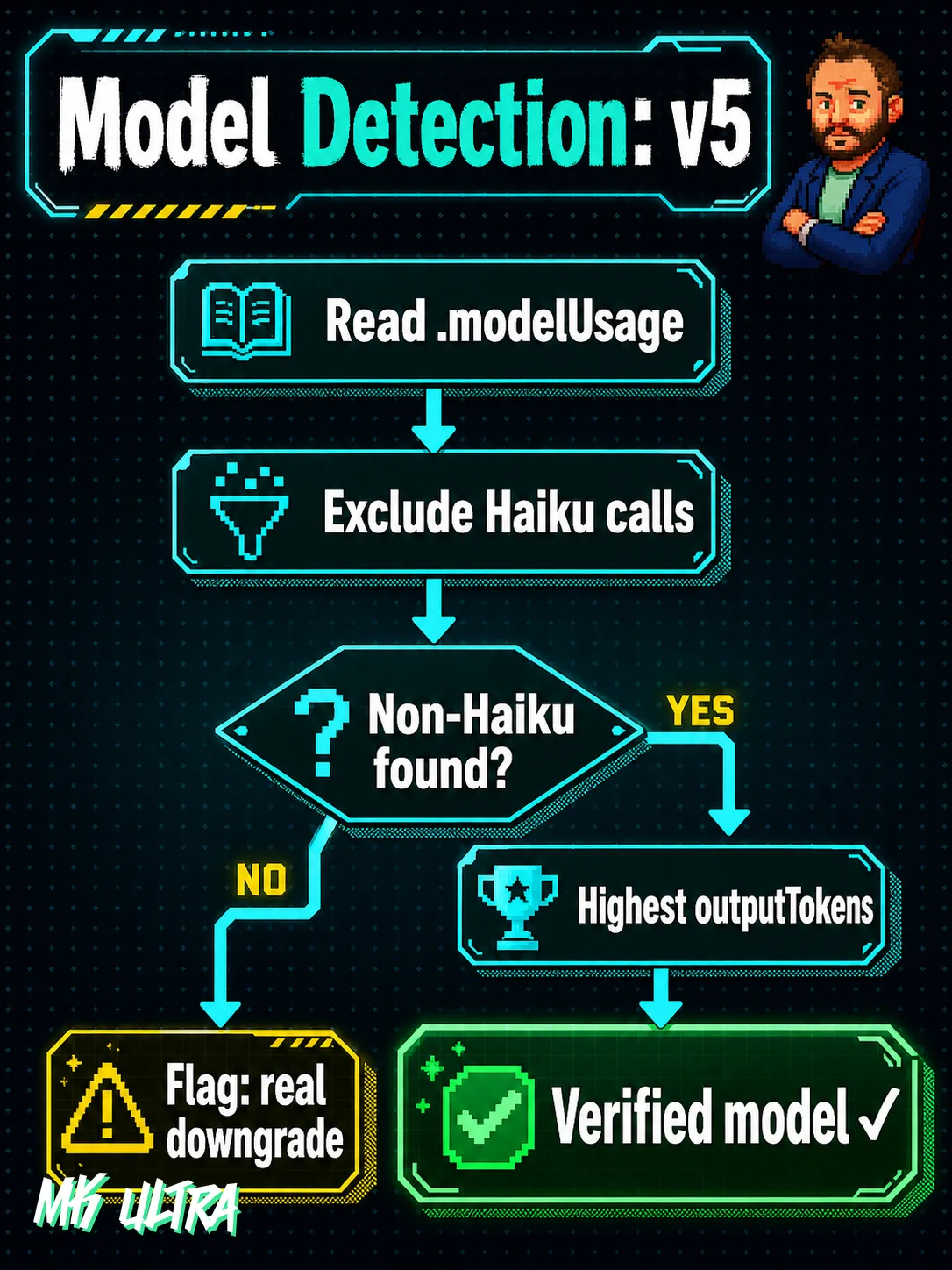
The robust fix (v5) is simple once you understand the mechanics:
- Read
.modelUsagefrom the transcript. - Exclude ALL Haiku models. They’re internal calls, housekeeping.
- From what’s left, take the one with the most
outputTokens. That’s the one that did your work. - Only if ALL models are Haiku: real downgrade. Flag it.
We added a permanent test that simulates a transcript with Haiku + Opus and verifies the guard reports Opus. If anyone touches the logic and breaks it, the test catches it before production. Zero trust, automatic verification.
This applies to anyone running AI agents in real pipelines: to know which model worked, never take the first, the last, or the highest token count alone. Exclude the internal calls and look only at the real work.
If you’re running LLMs in production, asking for Opus isn’t enough. You need to verify that Opus actually responded.
Next time your guard fires and the log tells you a story, open the transcript. Read what actually happened. This isn’t an edge case. This is what running AI seriously looks like.
FAQ: Claude Code Headless Mode and Model Detection
What is Claude Code’s headless mode (claude -p)?
It’s Claude Code’s non-interactive mode, designed for pipelines and automation. You pass a prompt via stdin or as an argument, it executes and returns the result via stdout in JSON. The --model flag doesn’t work in this mode: the model is controlled exclusively by the ANTHROPIC_MODEL environment variable.
What is .modelUsage in the Claude Code transcript?
It’s a field in the JSON output that lists all models invoked during the session along with their token counts. It includes both the model that did your work and those used internally (Haiku for session naming), so it cannot be used to determine which model actually worked without filtering out the internal calls.