React Bits is the kind of library that wins you over in seconds. Open the catalogue, move the cursor and suddenly every page seems to need an animated background, split text and a trail of particles. That is also the risk: mistaking an attractive demo for a sound design decision.
I reviewed it as I would use it in a real project with Claude Code or Codex. I checked the current code, licence, installation route, MCP setup and one actual component. I chose DotGrid, an interactive field of dots. The short conclusion is that React Bits can save plenty of work when the agent receives clear limits and the page does not become a theme park.

TL;DR: The No-Nonsense Summary
- What it is: an open collection of more than 200 animated and interactive React components.
- What it gives an agent: visible source code, four common variants and a registry compatible with shadcn.
- What I tested: the complete repository build and an isolated integration of DotGrid from the current official source.
- Result: both builds completed successfully. DotGrid adds GSAP and produces a substantial JavaScript bundle for a single background.
- MCP: React Bits connects through the shadcn MCP and its
@react-bitsregistry. It does not maintain a separate MCP server. - Main limitation: the tested component listens for mouse movement and clicks, but includes no built-in response to
prefers-reduced-motionand no touch interaction equivalent to cursor movement. - Licence: MIT with Commons Clause. Components can be used inside a product, but cannot be sold or redistributed as a component library.
- Score: awaiting Dani's approval. The review must show
--/100until a score is approved.
In this article
- In plain English: what React Bits does
- What the catalogue includes and why agents can use it well
- Real test: DotGrid from the current source
- React Bits on video
- React Bits MCP: what it does and how to connect it
- What I like
- What I would check before shipping
- Price and licence
- What people say about it
- React Bits compared with the alternatives
- Verdict
- Frequently asked questions about React Bits
- Sources and test scope
In plain English: what React Bits does
React Bits gives you ready-made visual pieces. It is neither a page builder nor a complete template. You choose an effect, bring the code into your project and adapt it to the design.
That distinction suits coding agents. Claude Code or Codex do not need to invent a field of dots, circular gallery or split-text entrance from scratch. They can start from a known implementation and focus on placement, colours, reduced motion and consistency with the visual system.
It also avoids a familiar trap: installing an opaque dependency and trusting it forever. The component ends up in your repository. You can read, change and remove it. Maintenance becomes your responsibility too.
What the catalogue includes and why agents can use it well
The official repository groups components into text animations, backgrounds, cursors, animations and components. The exact count changes as the catalogue grows, so the useful stable fact is that it now contains more than 200 pieces.
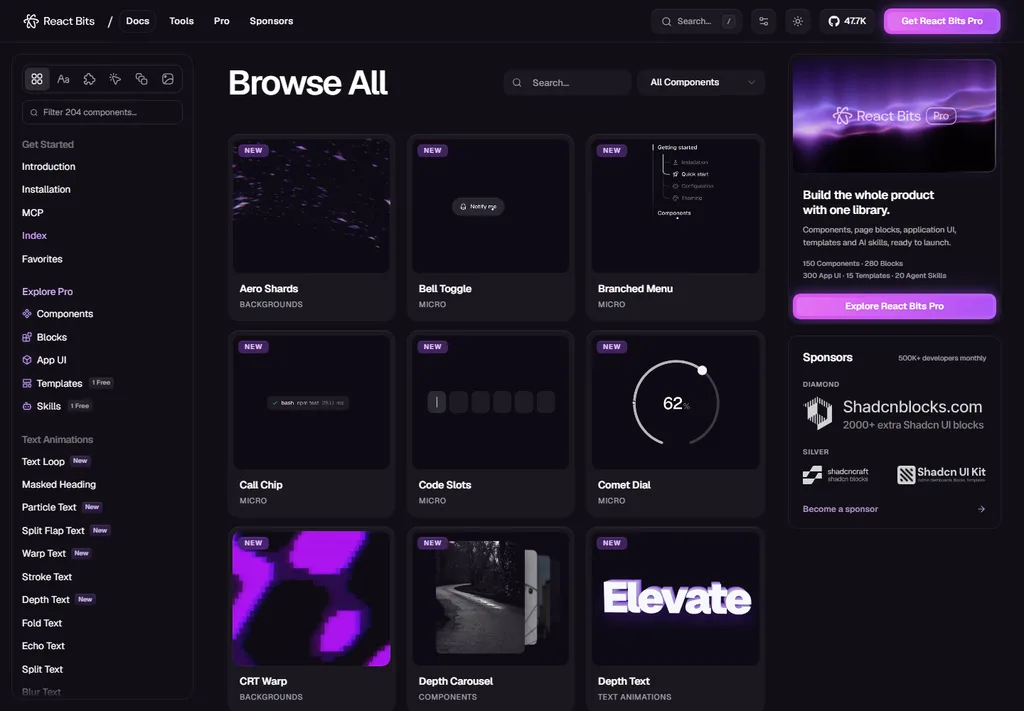
Components commonly ship in JavaScript or TypeScript and CSS or Tailwind variants. This matters. An agent can choose a version close to the project instead of translating it blindly and leaving a half-finished integration.
React Bits supports shadcn and jsrepo installation. With shadcn, the official pattern looks like this:
npx shadcn@latest add @react-bits/BlurText-TS-TW
I would not run that command without context. I would first tell the agent which component I want, where it belongs, which dependency it adds and how it should behave for people who reduce animation.
Real test: DotGrid from the current source
For this review I downloaded the official repository at its current revision on September 19, 2026. The complete build generated the registry with 816 files, produced a sitemap with 217 URLs and compiled 12,649 modules. It completed successfully, with Vite warnings about large chunks.
I then extracted DotGrid and placed it in a minimal React application. The isolated build also completed successfully. The component source is roughly 8 KB before minification, but it depends on GSAP and InertiaPlugin. In the minimal test, the final JavaScript was around 304 KB uncompressed and 101 KB with gzip. React and the small test shell account for part of that total, but the number still corrects a common assumption: a striking background is not free.
DotGrid draws the pattern on a canvas, follows mouse movement and reacts to clicks. The effect works and is easy to tune. In a short hero it can add depth without competing with the copy.
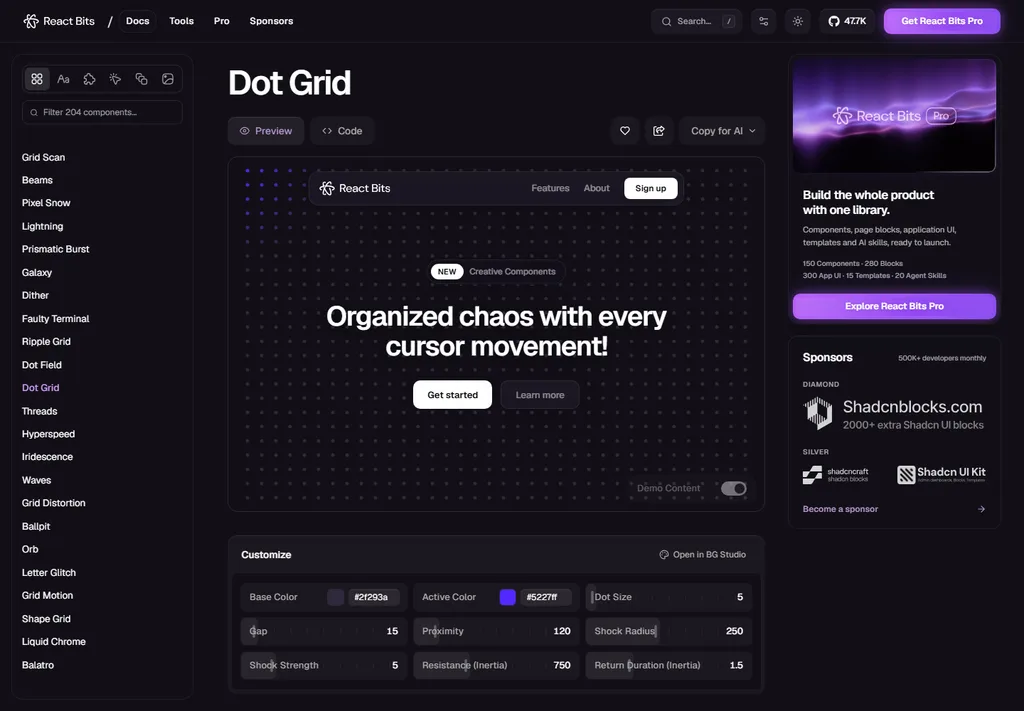
The current source does not query prefers-reduced-motion. It also does not use pointer or touch events to reproduce its mousemove interaction on mobile. A tap may result in a click, but the experience is not equivalent to moving a cursor. Before production, the agent should provide a static or disabled version for reduced motion and test the behaviour on a real touch screen.
React Bits on video
Code Like Dev's video is a quick visual tour of effects including Strands, Cubes, Galaxy, Circular Gallery, Border Glow and Lightfall. It lasts 14 seconds. It helps explain the catalogue, but it is not a test of the MCP or the engineering quality of each component.
React Bits MCP: what it does and how to connect it
React Bits does not run a separate custom MCP server. Its documentation recommends the shadcn MCP with the React Bits registry. The distinction matters because “install the React Bits MCP” sounds like an additional service or process.
First add the registry to components.json:
{
  "registries": {
    "@react-bits": "https://reactbits.dev/r/{name}.json"
  }
}
For Claude Code, the official initialisation command is:
npx shadcn@latest mcp init --client claude
Restart Claude Code afterwards. The /mcp command can confirm whether the connection is active. You can then ask the agent to list backgrounds from the registry or add a named component.
I would apply the same principle in Codex: connect a shadcn-compatible MCP server and keep the registry in components.json. The useful part is not brand recognition. It is the agent's ability to query the registry and bring the correct variant into the repository.
Prompt for the coding agent
Query the official React Bits registry through shadcn and find DotGrid in TypeScript with Tailwind. Before installing it, tell me which files and dependencies it will add. Integrate it only in the hero, keep the copy and call to action unchanged, and provide a static alternative for prefers-reduced-motion. Check horizontal overflow, contrast, touch behaviour and rendering cost. When finished, list the changed files and the tests you performed.
What I like
The first advantage is speed. An effect that could take several iterations is already implemented and configurable. For prototypes and pages with a clear visual direction, that can save meaningful work.
The second is visible source. You are not relying on a closed box or a subscription to keep the background running. The agent can explain and adapt the implementation.
The third is the range of formats. JavaScript, TypeScript, CSS and Tailwind cover many current React projects. The shadcn registry provides a practical route for Claude Code.
What I would check before shipping
Motion. An effect can feel pleasant for five seconds and exhausting during a long read. A reduced-motion alternative belongs in the integration.
Weight. Some components add GSAP, Three.js or other dependencies. The agent must inspect the selected piece instead of treating the whole library as one package.
Repository dependencies. npm audit reported 28 advisories after installing the complete project. I do not assign them to DotGrid: that total mixes the documentation site, build tooling and dependencies that do not necessarily ship with the component. Audit the actual tree you plan to deploy if you clone the whole project.
Mobile. A cursor-led component loses part of its interaction on touch. Decide whether it still works as a static background.
Accessibility. An attractive demo does not guarantee contrast, focus, keyboard support or comfort. React Bits provides the piece, not validation of the finished page.
Maintenance. Copying source gives control and responsibility. Later repository improvements do not automatically reach your version.
Price and licence
The repository and its components are free to use. The licence combines MIT with the Commons Clause. You can incorporate the code into a website, application or commercial product. The relevant restriction is that you cannot sell, sublicense or redistribute the components as products in themselves, or bundle them to compete with the collection.
This is not legal advice for a business that sells components. For an ordinary client site or your own product, the licence describes that use as allowed.
What people say about it
React Bits compared with the alternatives
If you need restrained, structural interface components, shadcn/ui is a more natural base. For marketing blocks and decorative patterns, Magic UI is close. If your priority is finding references before designing, Refero solves a different stage of the process.
React Bits fits when you already know which section needs improvement and want motion with personality. I would not use the catalogue to decide the entire visual direction of a site.
You can compare the other options in the UI component libraries for AI-assisted websites roundup.
Verdict
React Bits is a useful accelerator for design with coding agents. Open source, multiple variants and the shadcn registry let Claude Code or Codex work from concrete pieces instead of inventing them from scratch.
My rule would be simple: one component, one purpose and one test. If DotGrid helps separate the hero and keeps the call to action readable, it stays. If it only proves that we can move dots, it goes.
The score remains --/100 until Dani approves one. The current test confirms that DotGrid builds and works as a base, while also showing the work required for a serious integration: reduced motion, touch, rendering cost and visual review inside the real page.
Frequently asked questions about React Bits
Is React Bits free?
Yes. The repository and components are free under MIT with Commons Clause. You can integrate them into a product, but cannot resell the collection or components as a standalone product.
Does React Bits work with Claude Code?
Yes. The official documentation recommends configuring the @react-bits registry and using the shadcn MCP. Claude Code can also copy and integrate the source manually.
Does React Bits have its own MCP?
Not as a separate server. React Bits uses the shadcn MCP and publishes its catalogue as a compatible registry.
Can I use React Bits with Codex?
Yes. Codex can work with repository source, the shadcn registry or a compatible MCP server. Ask it to inspect dependencies, reduced motion, mobile and performance before completing the integration.
Does React Bits work on mobile?
Components can render on mobile, but behaviour depends on the piece. DotGrid is built around mouse movement and has no equivalent touch interaction in the source reviewed here.
Does React Bits hurt performance?
Not necessarily, but effects are not free. DotGrid adds GSAP and draws on a canvas. Other components use different dependencies. Measure the selected piece inside the real page.
Which component should I try first?
Choose one that solves a specific section. A background such as DotGrid can support a hero. A text animation can help a short entrance. Avoid installing several effects before checking whether the first one improves the page.
Sources and test scope
- Official React Bits repository, source and README checked September 19, 2026.
- Official licence.
- Current DotGrid source and its official video, included in the repository.
- Complete repository build and isolated DotGrid build run locally on September 19, 2026.
- shadcn MCP documentation.
- Code Like Dev video, used as a third-party visual tour.
- Original Reddit posts linked in the social section.
I did not measure conversion, FPS on physical mobile devices or every component in the catalogue. Build figures describe the tests performed in this environment and do not replace measurement inside your project.