Ask a coding agent to design a website without showing it anything and you can guess what comes next: a polished hero, four cards and the nagging feeling that you have seen the same page twenty times. I prefer to start with a different question: how have real products solved THIS interface problem?
That is why I use Refero. It does not hand me a finished website or a React component. It lets me study real screens and user flows, choose a useful pattern and tell the agent why that choice makes sense. Good references make the design conversation much more specific.

TL;DR: The No-Nonsense Summary
- What it is: a library of real product screens and flows for design research.
- What the agent gets: an MCP server that can search those references from Claude Code or Codex. Refero lists MCP access in its paid plans.
- What I verified: a real MCP search returned screens from Sunsama, Polar and Hume AI. A later session returned 401, so current access needs to be authorized again before I can call it verified.
- How I would use it: Refero to find concrete patterns, then Impeccable to shape and review the result. Refero's skill is useful, but I find the combination more compelling.

“Refero is a staple for me when designing websites with agents. Its price is competitive and, as of today, it offers a Lifetime license. Being able to feed an agent real references without another recurring fee is good news. Its skill is good, but I think it works even better alongside Impeccable.”
DaniIn this article
| At a glance | Detail |
|---|---|
| Website | refero.design |
| My use | Researching screens, patterns and flows before asking for code |
| Includes | Web library, Figma plugin, MCP and skill depending on plan |
| MCP | Official server at https://api.refero.design/mcp; paid access for licensed Pro, Team or Lifetime users |
| Skill | Official repository |
| Price checked | Pro from €10/month when billed annually; Lifetime €250 once, on September 17, 2026 |
| My test | A real search worked in August; a later query returned 401 in September |
The problem it solves
A screen can be well coded and still fail to answer the important question: what should a visitor see first? When I work with a coding agent, that decision comes before colors or components. If I only ask it to “make it modern”, it tends to fill the gap with a familiar layout.
Refero helps me research how other products organize a task, a list or a decision. I can give the agent a specific reference and explain which part I would use. The reference starts a better conversation; it does not decide the content, hierarchy or main action for me.
How to get started
I start with the Refero web library. I search for the type of screen or flow that resembles my problem, open several examples and note three things: what stands out, what stays in the background and what I would leave out of my project. That research does not require installing code.
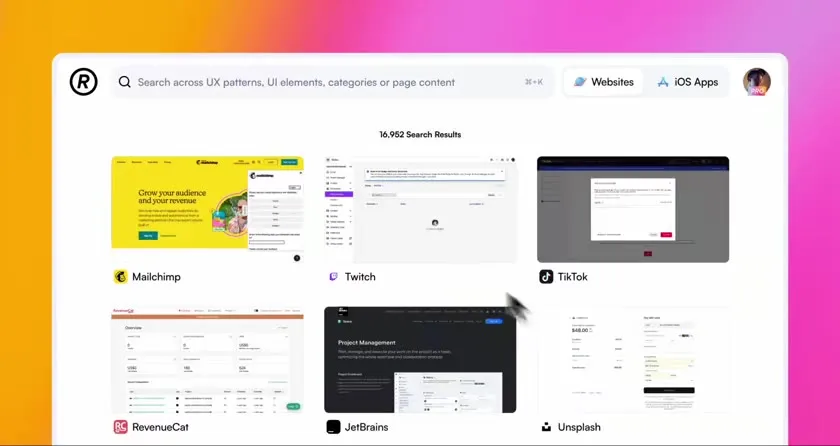
When I want to search from Claude Code or Codex, I connect the MCP with my account and check that a real query returns results. The official skill is a separate piece: it gives the agent a method for researching before building. I include the server, connection steps and a copyable prompt below. Adding the server to a configuration file does not prove that the account is authorized.
If you want to see the manual workflow first, Tania Driskill's walkthrough shows how she searches the library and uses a reference in a website. This is another creator's experience with the library, not a test of its MCP or a replacement for my own test.
Using it in a real marketing workflow
If I were designing the landing page for a tool that organizes daily work, I would not begin by asking an agent for a striking hero section. First I would decide how to show the main task, pending work and the next action. I would find references for those decisions and then brief the agent with the page's real content and priorities.
I connected Refero to my coding agents through OAuth and ran a real refero_search_screens query. I looked for references to three interface problems. Here are some useful results:
| Problem | Screen returned | What I would take from it |
|---|---|---|
| Show what matters today | Sunsama | Put today's work first and move the rest aside without hiding it |
| Find an action quickly | Polar | Offer global search and shortcuts without forcing users to learn them |
| Organize several types of content | Hume AI | Separate categories in the sidebar and offer tabbed views with cards |
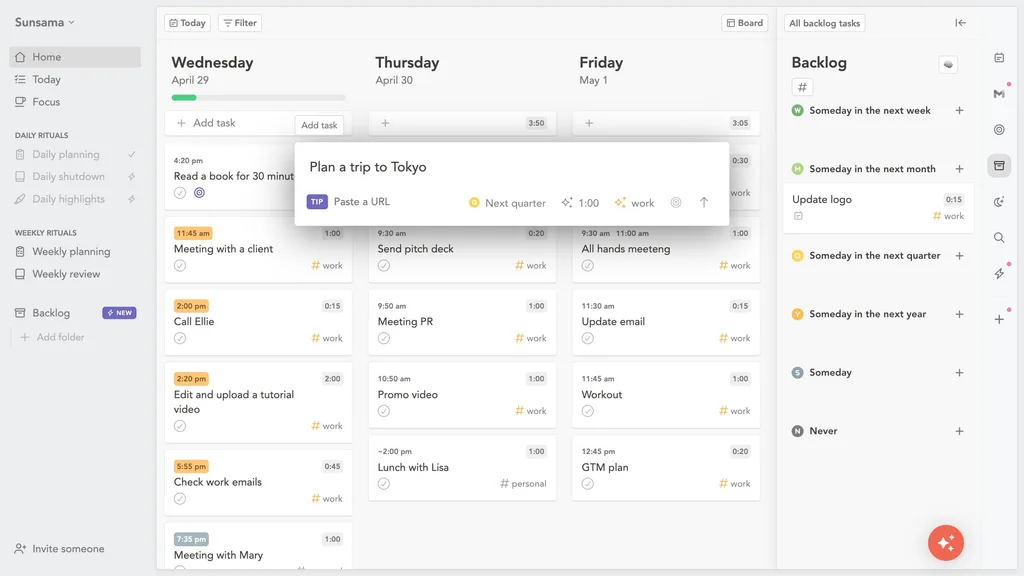
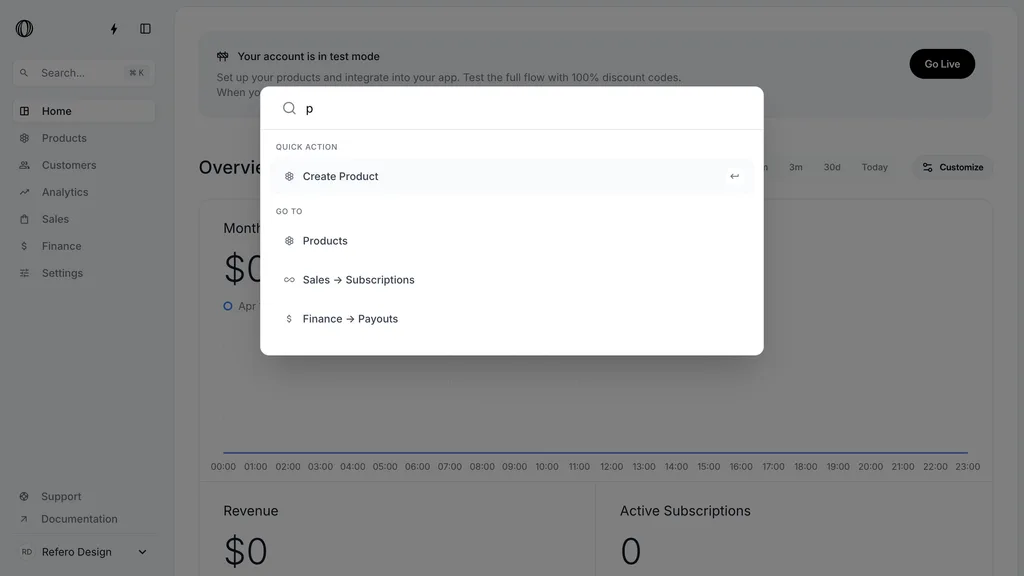
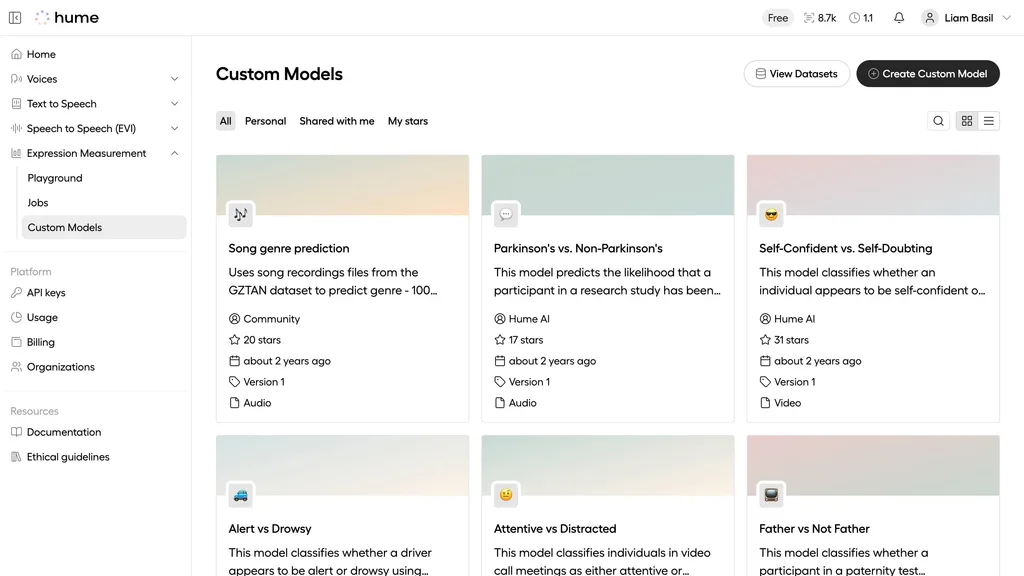
I would not copy any of those screens in full. The point is to break a reference down into decisions that fit your own case. A command palette cannot replace visible navigation when people need it. A new color will not fix too much content either.
Why I combine Refero with Impeccable
Refero's skill asks an agent to research before writing code. Good. The mistake would be to treat it as another magic instruction to “have taste.” References still need judgment.
Here is how I would split the work: search Refero for three examples of a specific problem, such as an empty state or a pricing screen. Write down what to borrow, reject and adapt to the brand and the actual content. Then use Impeccable to shape the interface, critique it and audit what the agent built.
Refero feeds the research. Impeccable helps work on the result. Neither tool knows who your customers are, what your page promises or what visitors need to do.
Refero MCP: what it does and how to connect it
The official Refero MCP lets an agent search screens and flows from its coding environment. The connection guide documents https://api.refero.design/mcp, authorization and client options. Refero says licensed Pro, Team and Lifetime users get up to 8,000 MCP calls per month.
The MCP and the skill do different jobs. The MCP gives the agent access to the library; the official skill proposes a research and design method. Refero publishes npx skills add https://github.com/referodesign/refero_skill as its skill installation command. It also offers a plugin for Codex; Claude Code supports the HTTP MCP server. Restart the client and authorize your account in the browser when prompted.
Paste this into Claude Code or Codex:
Read https://doc.refero.design/mcp/getting-started and install the official Refero MCP for this client. The manual server URL is https://api.refero.design/mcp. Back up the configuration and preserve my other servers. Use my account's official authorization flow and do not store keys in the project. Restart the client if needed, then verify access by searching for three real screens relevant to one specific design problem. Tell me which MCP tool responded and which references it returned. If you get 401, stop and explain how to renew access.
Test the connection: installing the server does not prove that the account can search.
What you should know before relying on it
The search I describe worked in August 2026. A later MCP call returned 401. I am not presenting the connection as verified today: before relying on it for another project, I would renew authorization and run another query. If the agent does not return real screens, setup is not complete.
Refero does not deliver components ready to install. An attractive screen can help you choose a hierarchy, but copying it without your own content, constraints and visual identity can produce another generic website. I would keep visual research separate from implementation and inspect the finished result in the browser.
Price and the Lifetime license
On September 17, 2026, Refero's pricing page showed Pro at €15/month billed €45 quarterly, Pro at €10/month billed €120 annually, and Lifetime at €250 as a single payment. The free plan allows limited browsing but does not include the MCP. These terms can change.
I subscribed to monthly Pro in August at €17/month plus applicable taxes. That is a different billing option from the annual and quarterly prices now shown on the site. Compare the same plan before deciding.
Lifetime is particularly appealing if you regularly feed design references to coding agents. Pay once, and there is no recurring subscription to think about. For a single project, trying Pro for a month first also makes sense. I would not buy Lifetime for a promise of “automatic design”: Refero gives you material to make decisions, not judgment itself.
What other users say
The response is mixed. In a recent r/UXDesign discussion, one person values the MCP and the price for personal use, while another says they have used Refero for years. An earlier comparison favors Mobbin for breadth. These are individual experiences, not a controlled comparison of the two libraries.
Alternatives: when I would choose something else
If you already know what to build and need code components, look at catalogs such as shadcn/ui or 21st.dev. If the problem is the finish of a page that already exists, I would start with Impeccable. Refero belongs earlier in the process, while you are still deciding what the experience should be.
Verdict
Refero has earned a place in my toolkit. It gets me out of the loop of asking for “something modern” and forces me to point to decisions I can defend. The MCP makes that research easier when authorization works; the skill adds a method. The price and Lifetime option strengthen my recommendation for anyone who designs with agents often.
I would not ask it to design for me. I would ask for good references, choose with care and then put the agent to work. And I would review the finished page, because that is where you find out whether the idea actually worked.
Frequently asked questions about Refero
Does Refero design the website for me?
No. It provides real screens and flows to research. Choosing a direction, adapting it to your content and reviewing the result are still your jobs.
Is Refero a React component library?
No. Refero helps you study interface decisions. If you need reusable code, see my UI component library collection.
What is the difference between the Refero MCP and its skill?
The MCP gives the agent access to the library. The skill suggests how to research references and turn them into design decisions. You can use both.
Do I have to pay for the MCP?
Yes. Refero lists MCP access for licensed Pro, Team and Lifetime users, but not for its free plan as checked on September 17, 2026.
What should I do if I get a 401 error?
Check your account access, restart the client and renew authorization. Run a real search afterward. Until the MCP responds, the installation is not verified.
Sources and test scope
- Refero, official MCP, installation guide, skill and pricing, checked September 17, 2026.
- Sunsama, Polar and Hume AI screens visually verified on Refero on September 18, 2026.
- My August 3, 2026 test: OAuth connection and a real
refero_search_screensresponse. A later query returned 401; current access has not been retested. - Refero's visual guide and Tania Driskill's walkthrough, checked September 18, 2026. The guide shows an older interface; the video covers manual research, not the MCP.
- Original conversations in r/UXDesign, September 2026 and r/UXDesign, May 2026. Individual accounts, not measured outcomes.