Meetings generate mountains of words and, far too often, four notes nobody can make sense of the next day. Google wants to fix that with Google AI Edge Foresight, an experimental Mac app that takes notes and processes conversations offline. It sounds powerful. But hold on: this is still a freshly baked demo, not the universal meeting assistant.

TL;DR: The no-nonsense summary
- Local AI: Google says Foresight processes audio and sensitive data on the Mac, even offline.
- More than transcription: it expands notes, lets you query meetings, and finds context in documents and other files.
- Experimental product: there are no independent tests of its accuracy, resource use, or Spanish-language quality.
- Spain and the EU: regional availability has not been confirmed.

To me, it is power: I can do whatever I want, multiply myself by 20, and see what I can do.
DaniIn this article
Availability in Spain/EU: Unconfirmed
The source does not confirm availability in Spain/EU. Rollout phase unspecified. Eligibility: macOS users.
What is Google AI Edge Foresight?
Google AI Edge Foresight is an experimental macOS app that captures conversations, generates notes, and lets users query content through locally run AI models. Google announced it on October 6, 2026, on its official developer blog.
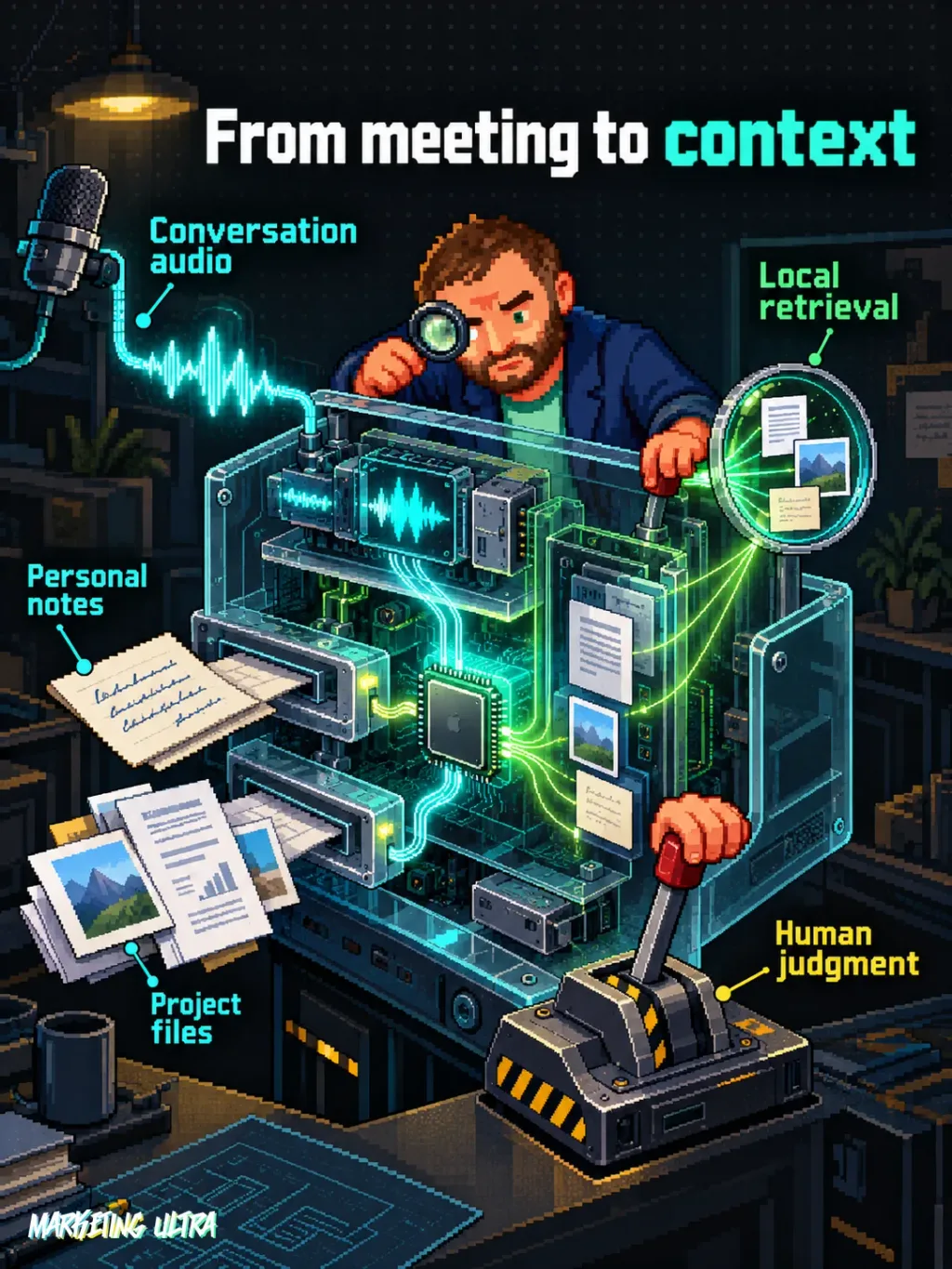
The app connects to the microphone and system audio. According to Google, that means it can work with any meeting platform as well as in-person conversations picked up by the microphone. It does not depend on Zoom, Meet, or Teams deciding to let it in. That detail matters more than it may seem.
Foresight keeps user-written notes separate from AI-generated ones. If you jot down a short phrase during a meeting, it can expand it by retrieving details from the conversation. It also lets you ask questions about the transcript through a Gemma 4-powered assistant, according to TechCrunch.
Google also uses EmbeddingGemma 2 to search for and retrieve information across images, documents, transcripts, and notes. Its knowledge base supports references including PDFs, Google documents, Microsoft Office files, text, Markdown, and web bookmarks. In other words, the meeting stops being an isolated recording and starts interacting with the project material.
Why do offline meeting notes matter in marketing?
For a marketing team, the potential value lies in retaining context without relying on a stable connection or sending every conversation to a remote service. Interviews, campaign meetings, creative reviews, and sales sessions can become searchable material within the team itself.
And that is the key point: a verbatim transcript does not solve much. It turns one hour of audio into twenty pages of text. The useful leap comes when you can ask which objections kept coming up, what tasks were left pending, or which campaign hypotheses were discussed.
For me, AI works when it multiplies my output and clears the path for me to think about what to do next. Foresight points right in that direction. The machine retrieves the detail; judgment remains human. Asking it to recall a decision makes sense. Letting it decide which decision was right is a different story.
There is another, less obvious advantage: reducing the handoff of files between recorders, transcription services, documents, and summaries. Every jump makes it easier to lose context or paste sensitive information where it does not belong. Local processing could save us part of that journey.
Local processing: privacy promised, not audited
Google says Foresight's AI processing happens entirely on-device, works offline, and keeps sensitive data on the Mac. That is a meaningful difference from many tools that upload audio to external servers for transcription.
But pay attention to the verb: Google says so. The available sources provide no independent audit showing how data is stored, which logs the app keeps, or what protections it offers if something goes wrong. “Local” improves the privacy proposition; it does not grant magical immunity.
It follows the same logic we saw when discussing local AI voice cloning and OpenWhispr for local dictation, but applied to meeting memory.
That does not remove the team's obligations. Recording or transcribing a conversation may require informing participants, complying with internal policies, and reviewing applicable regulations. Processing audio inside a Mac does not make a hidden microphone a good idea. Obviously.
Can you use Google AI Edge Foresight in Spain?
It has not been confirmed that Google AI Edge Foresight is available in Spain or the European Union. The official announcement provides a download, but it does not list countries, confirm regional eligibility, or publish a general rollout timeline.
Availability in Spain and the EU: unknown.
- Stage: experimental app, with no general availability announced.
- Platform: macOS, optimised for Apple Silicon devices according to Google's FAQ cited by TechCrunch.
- Languages: Google has not published a list of supported languages or demonstrated Spanish transcription quality.
- Requirements: no complete minimum macOS, memory, or storage requirements have been provided.
An accessible page or visible download does not prove regional availability. We also do not know how much it consumes, how well it handles meetings with several speakers, or whether its summaries can withstand a genuinely technical conversation. 9to5Google confirms on-device processing and note expansion, but does not fill those gaps.
Is Foresight worth trying?
Yes, once the download is legitimately available in your region and you are willing to test an experiment. I would start with an internal meeting containing no sensitive information and compare the notes with the original conversation. Look for omissions, wrongly attributed decisions, and above all, tasks nobody ever mentioned.

I would not use it to record critical client meetings just yet. There are no independent assessments of accuracy, latency, battery use, or summary reliability. And a beautifully written note that assigns a decision to the wrong person is worse than an ugly notebook.
Copy this and paste it into Claude Code, Cursor, or your favourite coding assistant:
Check whether my Apple Silicon Mac meets the published requirements for Google AI Edge Foresight, using only https://developers.googleblog.com/en/google-ai-edge-with-embeddinggemma-2/.
Do not install anything if regional availability, compatibility, or the download source are unclear.
If you can confirm those points, guide me and set up a test with a fictional conversation to check transcription, summarisation, and questions.
You do not need to know how to code. The assistant can guide you through the checks and, only if it confirms compatibility and the download source, the installation and testing.
Google AI Edge Foresight is heading in a direction that interests me: useful, local AI embedded in real work. But “experimental” is there for a reason. Before trusting it, you need to test it and compare its notes with what actually happened. Enthusiasm moves fast; a badly summarised decision moves faster.