Google just released v25.1 of its Ads API and, buried in the release notes, there is a detail that should be flashing on your screen: the exact dates when each Search campaign will automatically migrate to AI Max. The AI Max auto-migration kicks off on September 1, 2026. If you manage Google Ads campaigns and have not made a move yet, this guide is for you.

TL;DR: The no-nonsense summary
- Mandatory migration: from September 1, 2026, campaigns with campaign-level broad match and ACA migrate to AI Max automatically.
- API v25.1 with exact dates: the aca_migration_date_time and broad_match_migration_date_time fields reveal when each campaign migrates.
- Default settings: search term matching is enabled in all cases; text customization only in ACA campaigns.
- DSA gets a reprieve: dynamic search ad migration is delayed until February 2027.
In this article
What Is AI Max Auto-Migration and When Does It Start?
AI Max auto-migration is the process by which Google automatically converts certain Search campaigns to the AI Max system, an artificial intelligence layer that manages query matching, generates ad copy, and selects landing pages.
Make no mistake: Google is not creating a new campaign for you. It is changing the one you already have. If your campaigns use campaign-level broad match or automatically created assets (ACA), they are going to migrate. The timeline shows two waves:
- September 1-30, 2026: campaigns with campaign-level broad match and ACA.
- February 2027: dynamic search ad (DSA) campaigns, delayed from September.
Since August 3, 2026, Google no longer allows creating new legacy broad match or ACA configurations. That door is closed.
Exact Dates by Campaign: The API v25.1 Advantage
The Google Ads API v25.1, released on August 19, 2026, introduces two fields that change the game for agencies: campaign.aca_migration_date_time and campaign.broad_match_migration_date_time. You can query the exact date when EACH campaign in your account will migrate to AI Max.
Why does it matter? If you manage 100 or 300 campaigns, they do not all migrate on the same day. Without these fields, you are flying blind. With them, you can prioritize: which campaigns need urgent attention, which ones have time to spare, and which ones are worth migrating manually so you get to choose the settings.
This data is only available via API or Google Ads scripts, it does not appear in the standard interface. Worth keeping in mind.
Copy this and paste it into Claude Code, Cursor, or your favorite coding assistant:
Generate a Google Ads script that queries the API v25.1 and lists all active campaigns with their aca_migration_date_time and broad_match_migration_date_time fields. Export the result to Google Sheets with columns: campaign name, ID, ACA migration date, and broad match migration date.
No coding knowledge required. The assistant handles the setup, configuration, and testing.
Default Settings: What Gets Turned On and What Does Not
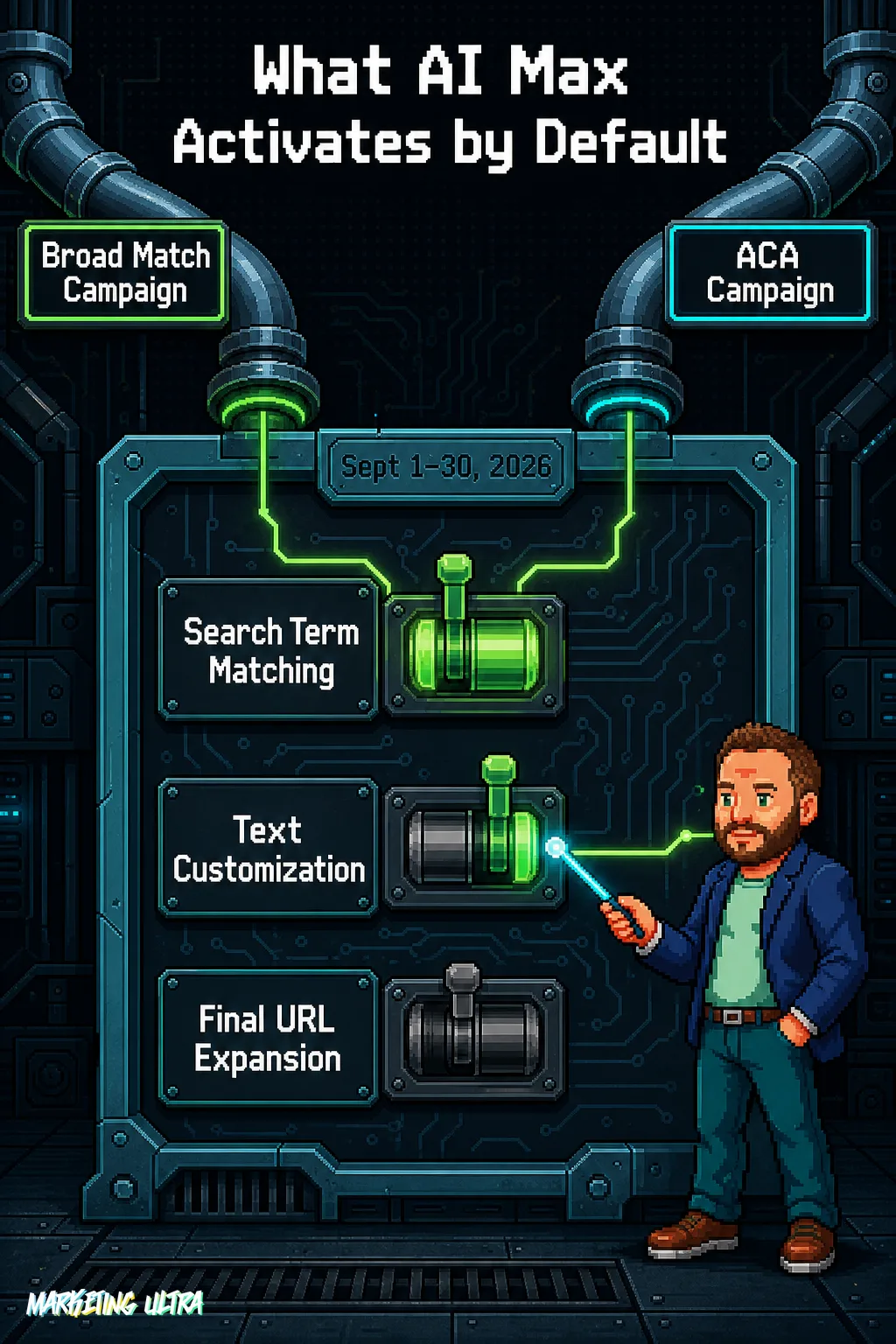
When the migration runs, not all AI Max features are activated the same way. It depends on the type of original campaign:
Campaign-level broad match campaigns:
- Search term matching: on.
- Text customization: off.
- Final URL expansion: off.
ACA campaigns:
- Search term matching: on.
- Text customization: on.
- Final URL expansion: off.
Search term matching is the highest-impact change: it expands query eligibility beyond your keyword list. In ACA campaigns, the AI will also generate headlines and descriptions dynamically. If your brand campaigns are sensitive, review what gets enabled before Google does it for you.
How to Prepare Your Campaigns Step by Step
Whether this becomes a disaster depends entirely on what you do before September 1:
- Audit which campaigns are affected. Identify which ones use campaign-level broad match or ACA. The API v25.1 fields give you the exact list.
- Migrate manually before the deadline. That way you choose the settings instead of accepting the defaults.
- Review brand inclusions and exclusions. They carry over to the new system, but it is worth double-checking.
- Strengthen your negative keyword list. With expanded search term matching, negatives are your last line of defense against junk traffic.
- Back up your current data: search term reports, keyword lists, asset performance, and conversion settings. Rebuilding all of this after the migration is a nightmare.
If you need a deep dive into Smart Bidding and campaign structure, the complete Google Ads guide is your reference.
Is AI Max Worth It? The 7% Has Fine Print
Google claims AI Max drives 7% more conversions or conversion value at a similar CPA or ROAS. Sounds good. But that figure excludes retailers and compares full AI Max against the search-term-matching-only version, not exactly an apples-to-apples comparison.

Independent analysis tells a different story: managers are reporting massive impression volumes with zero conversions, and significant CPA spikes when accepting the default settings.
The real issue, I would argue, runs deeper: who has the information to manage this. Migration fields live in the API, not the interface. Agencies with technical teams will know exactly when and how to prepare. Advertisers managing their accounts from the dashboard will not even realize it has happened until it is done. Google is creating a two-tier system: those who control the API and those who take whatever comes. In a change where the defaults can quietly inflate your CPA without you noticing, that asymmetry is a serious problem.
AI Max auto-migration is not optional. It is happening. Migrate first, choose your settings, protect your negatives, and check the API for your dates.
Every time someone says "just trust the algorithm," I think the same thing: the algorithm does not pay your bills.
Frequently Asked Questions About AI Max Auto-Migration
Does AI Max auto-migration cost extra?
There is no direct cost, you do not pay more to use AI Max. The risk is indirect. In practice, CPA spikes after activation have been widely reported, because expanded search term matching enters your ads in more auctions and drives up CPCs.
Can you turn off AI Max after migration?
Yes, you can disable individual AI Max features (search term matching, text customization, final URL expansion) after migration. What you cannot do is go back to the old system. That is why the recommendation is to migrate manually before September: you choose each setting on your own terms.