If you're running Google Ads campaigns with days turned off via scheduling and haven't reviewed your daily budget lately, this article is for you. And if you think ad scheduling works as an indirect brake on monthly spend, it's for you too. Especially you.
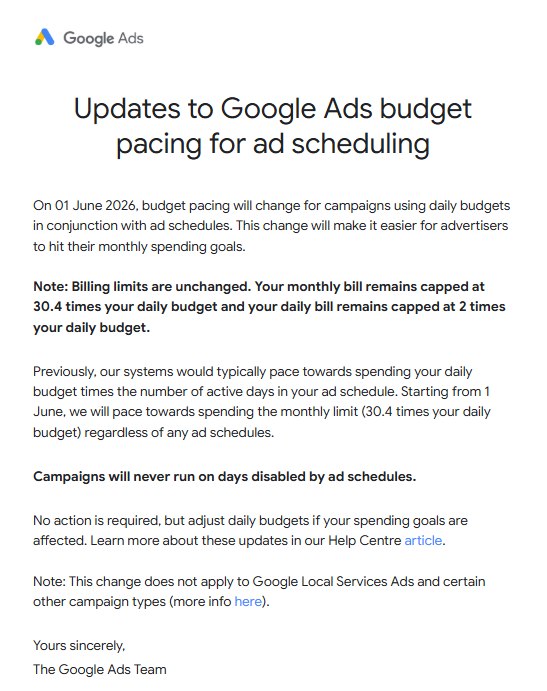
Google has announced a change to how budget pacing works for campaigns with ad scheduling. It takes effect on June 1, 2026. And while it makes technical sense, there's a business angle behind it that deserves more than a sterile help center notice.
In this article
What Exactly Changes
Before getting into opinion, the technical change deserves a clear explanation, because the details matter.
Until now, when you set up a campaign with a $100 daily budget and scheduled it to run only on certain days of the week, Google adjusted its pacing based on the number of active days in the month. If the campaign only ran 20 days a month, the system aimed spend toward $2,000 per month ($100 × 20 active days).
With the new system, that goes away. Starting June 1, 2026, Google will try to spend up to the full monthly cap: 30.4 times the daily budget. In the same example: $3,040 per month. On days the campaign doesn't run, it won't spend anything. But on active days, the system will try to compensate to still hit that full monthly cap.
Google's own example in its official documentation illustrates this:
A campaign with a $100 daily budget, active only 20 days a month, used to pace toward $2,000 per month. It will now pace toward $3,040 per month.
The formal limits don't change: the monthly cap remains 30.4 times the daily budget, and the daily cap stays at 2 times the daily budget. But what does change is the internal pacing target, which shifts from respecting the active schedule to chasing the theoretical monthly maximum regardless of that schedule.
Which Campaign Types Are Affected
The change applies to campaign types that support ad scheduling: Search, Display, Video, Shopping, Performance Max, and YouTube. It also affects campaigns using shared budgets.
Not affected: Local Services Ads, Hotel Commission Ads, and Smart Campaigns. App campaigns are also excluded since they don't support ad scheduling to begin with.
One important nuance: the change only affects schedules that disable the campaign on full days of the week. If your ad schedule only limits hours within a day (for example, only active from 9 AM to 9 PM), this change doesn't apply to you.
| Campaign type | Supports ad scheduling? |
|---|---|
| Search Network | Yes |
| Display Network | Yes |
| Shopping | Yes |
| Display Video | Yes |
| YouTube | Yes |
| App | No |
| Smart | No |
| Performance Max | Yes |
| Demand Gen | Yes |
| Hotel | Yes |
| Travel | Yes |
Source: Google Ads Help, Changes to Google Ads budget pacing for Ad Scheduling
Why Google Is Doing This (The Official Version and the Real One)
The official version is that the change improves monthly spend predictability. And that logic holds: if an advertiser raises their budget or changes scheduling mid-month, the old system created inconsistencies. With the new pacing toward the full monthly cap, behavior is more uniform and, in theory, more predictable for the advertiser.
So far, reasonable.
The real version is more interesting. Google has had access to data from millions of accounts for years. And what they've almost certainly detected is that a significant number of advertisers use day-based scheduling as an indirect lever to control monthly spend without touching the daily budget. In other words: set $100 a day, run the campaign only on Monday, Wednesday, and Friday, and "control" the monthly total that way.
It's a widespread practice. And Google has just announced that approach no longer works the way it used to.
Coincidence? Not really. If advertisers who set up scheduling never revisit their budgets, and the system shifts to chasing the full monthly cap, the result is more spend in those accounts. Without anyone explicitly clicking approve.
It's not that Google is the villain of the story. It's that their incentives aren't always aligned with those of the advertiser who isn't watching.
What Actually Stops Working
This change has a practical consequence that needs to be stated plainly: ad scheduling no longer works as an indirect budget control mechanism.
If you've been using day-based scheduling to modulate monthly spend without touching the daily budget, that lever is gone. Either you review it, or Google will spend toward the full monthly cap on your active days.
And here's the real trap for many accounts: it's not that the system is broken. It's that the system works exactly as it has always said it works, but advertisers assumed a behavior that was different from what was documented, and that assumption won't hold even as a de facto behavior after June 1.
In plain terms: if you have campaigns with days turned off and haven't reviewed your daily budget with this change in mind, June 1 could bring surprises.
The Problem Isn't Automation. It's Automation on Autopilot
Here's the part I find most worth addressing.
There's a strain of thinking in paid media that has spent years selling the idea that AI and automated campaigns do the work for you. That with Performance Max, Smart Bidding, and a handful of settings, you can walk away from the account. That the system learns, optimizes, and that's that.
And yes, the AI in Google Ads is genuinely powerful. It optimizes bids in real time better than any human can. It redistributes budget across signals no analyst could process manually. It does things that would have looked like magic ten years ago.
But AI executes what it's told to do. It doesn't fix a flawed setup on its own. It doesn't detect that you're using scheduling as an indirect budget brake and that approach expires in June. It doesn't warn you that your spend control strategy has a shelf life.
A skilled account manager catches that. An account on autopilot doesn't.
This Google change is, among other things, a reminder that automating is not the same as delegating and forgetting. The platform optimizes within the framework you define. If the framework is poorly defined, or if the rules change and no one updates the framework, the system will keep executing with perfect efficiency in the wrong direction.
What You Need to Review Before June 1, 2026
Without further philosophy, here's what needs to happen:
1. Identify which campaigns use full-day ad scheduling.
Look for active campaigns with full days of the week disabled and a daily budget set. Those are the ones at risk.
2. Calculate the real impact on your monthly spend.
Compare what you were spending under the old scheduling setup versus what 30.4 times your current daily budget looks like. The gap is your potential overspend if you change nothing.
3. Adjust your daily budget if you want to maintain the same monthly spend.
If you were spending X per month across 20 active days and the system is now going to aim for X multiplied by 1.52, you'll need to reduce the daily budget to compensate. The formula: divide your target monthly spend by 30.4.
4. Stop using scheduling as a budget control tool.
That's the underlying lesson here. If you want to control monthly spend, do it through the daily budget, not through active days. They're different levers with different behaviors, and after June, conflating them has a more visible cost.
5. Review shared budgets too.
If you share a budget across campaigns and any of them use day-based scheduling, the change applies. Don't assume the internal distribution logic compensates.
6. Put it on the calendar now.
June 1 comes faster than it seems. If you manage high-volume accounts, this review isn't something you can knock out in five minutes the day before.
The Conclusion Many Don't Want to Hear
Google made an operational change that makes technical sense. Pacing toward the full monthly cap is more consistent and predictable, in theory. And it addresses a real friction point when you change scheduling settings mid-month and want to hit your spend target without manually readjusting the budget each time.
But it does so in a way that, without someone actively reviewing accounts, favors spend above what the advertiser had in mind. It's not a bug. It's the natural consequence of Google's incentives not matching yours.
Google Ads AI optimizes to spend the budget you give it as efficiently as possible. It does not optimize to keep you from spending more than you planned. That remains human work.
And every time someone tells me that campaign management can be fully automated and left to run on its own, changes like this prove my point without me having to say another word.
Do you have campaigns with days disabled via scheduling and still haven't reviewed the daily budget with this in mind?
PS: Google's official documentation on this change is available in the Google Ads Help Center. Read all of it, not just the headline.