Shopify has just rolled out two features that merchants with teams have been asking for: Activity Logs to track who changed what in your admin panel, and a central hub to manage all your POS devices from one place. About time. But as with any polished announcement, it's worth looking under the hood.

TL;DR: The straight version
- Activity Logs: records actions by owners, staff, and apps (deletions, settings changes, app access). Read-only, capped at 250 results, no direct export.
- POS Control: new "Devices" view to monitor tablets, phones, and card readers. Online/offline status, app version, and remote actions.
- MDM for larger fleets: mobile device management integration for merchants running multiple locations. Kiosk mode, app locking, and update control.
- EU/UK availability: unconfirmed by Shopify, despite being announced as a global rollout.
In this article
What Does Shopify Activity Logs Actually Record?
Shopify Activity Logs is a record of actions taken by owners, staff, and apps inside the admin panel. That covers a lot: deleting products, touching store settings, granting app access, simultaneous activity from multiple users on the same page. In POS environments, it also logs high-risk actions: voids, refunds, and manual discounts.
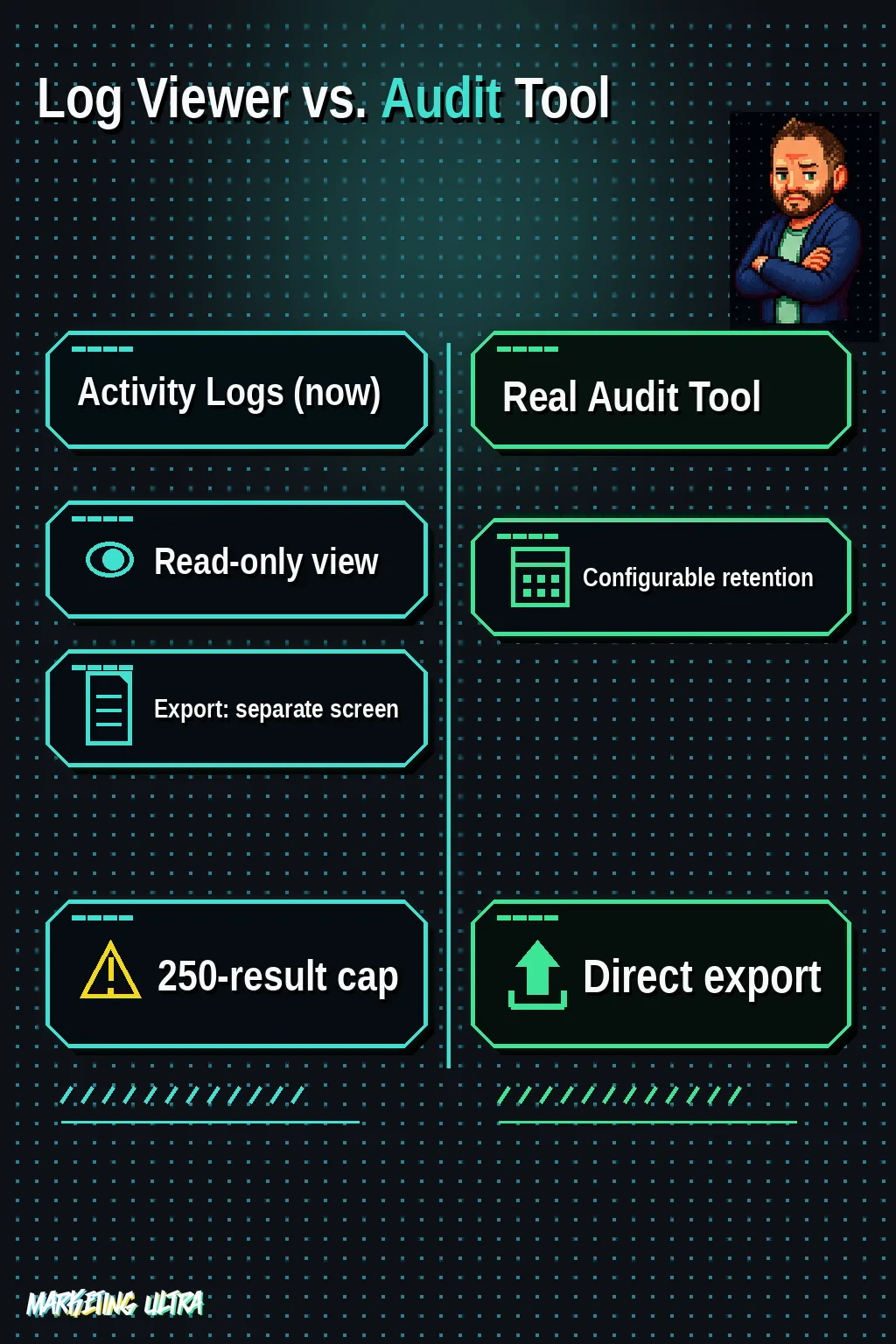
Sounds thorough. The problem is what it does NOT do.
The log is read-only. You can't expand or click into events to see details. You can't export directly from that view. And it caps out at 250 results, with a retention window that shifts depending on your store's activity volume. High-traffic stores will see older events disappear fast.
Is there an export option? Yes, but it's a separate CSV export feature covering four categories: users, roles, groups, and activity logs. It's designed for security and compliance audits. A viewer capped at 250 lines is a very different thing from a real audit system.
POS Device Control from Shopify Admin
The new "Devices" view in the POS channel pulls all your tablets, phones, and card readers running Shopify POS into a single screen. Your entire terminal fleet, one place. This one solves something concrete.
You can monitor each terminal's online/offline status, check which app version is installed, and run remote actions: sign out or remove a device from the system if it goes missing, gets stolen, or is decommissioned. If you're managing 15 terminals across 4 locations, being able to remotely sign out a device that's gone walkabout is the difference between sleeping soundly and not.
And if you run multiple physical stores, Mobile Device Management (MDM) software integration takes it to another level: control when updates roll out to device groups (test on a pilot batch before pushing to the whole fleet), activate kiosk mode to lock a terminal exclusively to Shopify POS, block unauthorized apps, and enforce passcode policies.
That's proper fleet management.
Who Actually Cares About This?
Merchants with teams. If you're a solo operator with no physical point of sale, Activity Logs does give you visibility into what your apps are doing, which is not nothing, but the bulk of the value is knowing what each team member touched and when.

If you run physical stores with employees on POS, both features work together: Activity Logs tells you if someone applied a suspicious manual discount, and device management lets you act on the terminal directly. Together, they start to look like real accountability.
If you sell online only and run your store by yourself, this doesn't change your day. Worth saying plainly.
In my experience with merchants scaling operations, the real pain has always been the same: retention and granularity fall short of what a serious audit actually demands. 250 results with no direct export is a status viewer, not a compliance tool. Shopify knows this, which is exactly why the CSV export lives as a separate feature. But that split between "viewing" and "exporting" forces a manual process that doesn't scale for high-volume merchants. I'd wager we'll see improvements to retention or a more capable logs API in the coming months. That's the logical next step when you start marketing these features under "security and accountability" in your product notes.
EU and UK availability: unconfirmed. Shopify is announcing both features as generally available "for all merchants," but the official changelog does not specify whether the European Economic Area or the UK are included in the rollout. Check your Shopify admin directly to see if you have access yet.
Shopify keeps stacking pieces in the same direction. Following the 150 updates in the Spring Edition 2026, these two features point the same way: more control for merchants operating with teams and physical stores. POS device control works from day one and solves a real pain. Activity Logs, in its current state, is a first look: useful for a quick check, not enough for anyone who needs a real audit. If Shopify wants it to be one, it needs configurable retention, more granularity, and an export that doesn't live on a separate screen. Everything else is window dressing.
Frequently Asked Questions About Shopify Activity Logs and POS Management
What is kiosk mode in Shopify POS?
Kiosk mode locks a device so it only runs the Shopify POS app: staff can't open other apps, browse the web, or change device settings. It's activated through an MDM solution compatible with Shopify and is particularly useful in high-traffic stores where devices are exposed to the public.
Can you export Shopify Activity Logs?
Not directly from the Activity Logs view, which is read-only and has no export button. Shopify provides a separate CSV export feature covering users, roles, groups, and activity logs, designed for security and compliance audits. They are two distinct tools inside the Admin.