
Adding an animation is easy. Getting an interface to respond with the right duration, curve and focus is another matter entirely. Emil Design Engineering turns Emil Kowalski’s design and motion principles into instructions for coding agents, though it does not replace professional review or prove on its own that the result is accessible.

TL;DR: The No-Nonsense Summary
- What it is: a collection of skills that brings Emil Kowalski’s design and animation principles to a coding agent.
- What it fixes: clumsy durations, unsuitable curves, unnecessary animations and microinteractions that fail to respond as they should.
- Installation: the repository specifies a single command through the skills CLI.
- The decisive limitation: these are the author’s prescriptive rules, not an independent accessibility reference or an automatic guarantee of quality.
In this article
| What it is | A collection of skills that injects Emil Kowalski’s design principles into your coding agent to refine animations, components and microinteractions. |
|---|---|
| Official website | https://emilkowal.ski/skill |
| Repository | repository |
| License | MIT |
| Price | open source |
| Alternative to | Manual review of animations and interaction details by a senior designer |
| GitHub stars | 39,914 |
| Launch year | 2026 |
| Maintained by | emilkowalski (individual) |
Reviewed on 2026-09-25
This tool is included in these collections: Design skills for Claude Code and Codex · Skills for Claude Code, Codex and Coding Agents by Task
The Problem It Solves
Emil Design Engineering aims to solve a fairly obvious gap: agents write functional code, but they do not always know when an animation is unnecessary, how long it should last or where an element should appear from.


The main emil-design-eng skill organizes that judgment around animation, components and small interaction details. Its premise is that an interface feels better when many nearly invisible decisions are handled well.
Put plainly: it helps stop your agent from turning every button into a theme-park ride. It makes it justify motion, choose a curve, limit duration and think about focus, frequency of use, interruptions and reduced motion.
That places it among the design skills for coding agents and, for compatibility, also within the general guide to skills for Claude Code and Codex. This is one review of the Emil package, with emil-design-eng as the entry point. Animate, review-animations and apple-design are modules from the same repository. There is no need to pretend they are three separate tools.
Getting Started
The official README prescribes this command: npx skills@latest add emilkowalski/skills. The verified evidence does not confirm specific CLI destinations. No local installation was run for this review either.
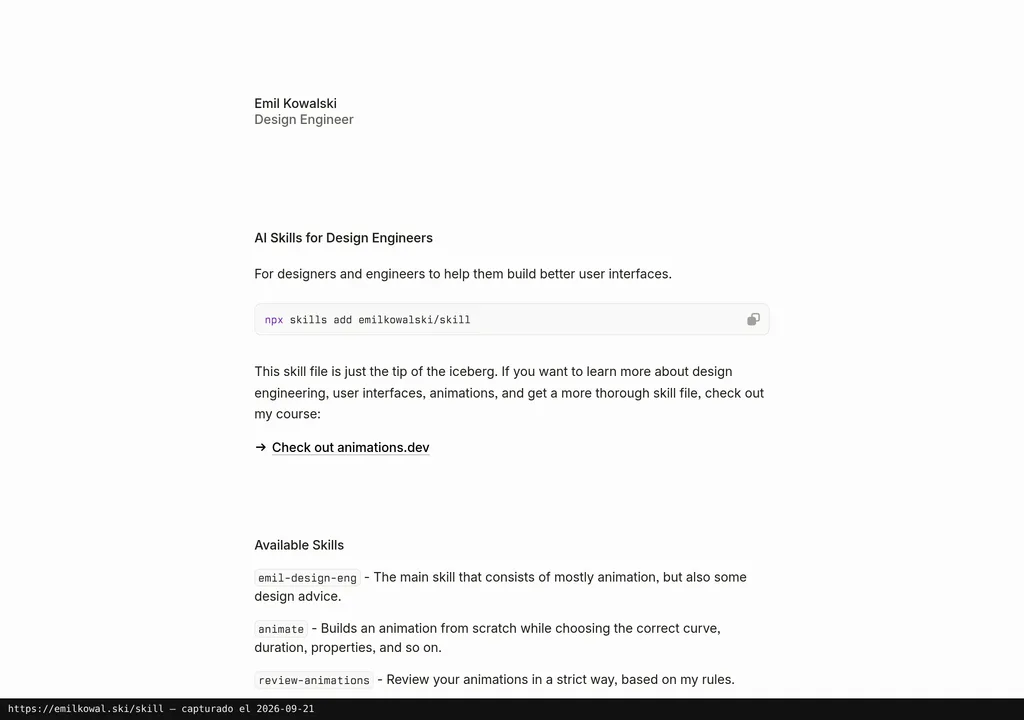
The repository is open source and MIT-licensed. No purchase price is listed for the skills. There is also not enough information to calculate potential costs for the environment, coding assistant or other services you use around it.
After installing it, the most sensible reproducible test is to ask the agent to review a specific interaction, such as a dropdown with ease-in, 400 ms and a centered origin. The response should identify those ingredients and propose a Before/After table. If it does, the instructions have loaded. That is as far as the test goes: it does NOT prove that the final interface is good, accessible or smooth on every device.
Copy this and paste it into Claude Code, Cursor or your favorite coding assistant:
Install Emil Design Engineering from https://github.com/emilkowalski/skills using the official command.
Enable emil-design-eng and review a dropdown with ease-in, 400 ms and a centered origin.
Return a Before/After table and check prefers-reduced-motion.
The repository only documents the installation command. Configuration and testing depend on the environment you use.
MCP for Emil Design Engineering (Emil Kowalski Skills)
There is no documented official MCP integration. The repository explains installation through the skills CLI. Inventing a server, connection or capabilities that are not listed there would be pure smoke and mirrors.
Does that prevent you from using it? No. A skill and an MCP solve different problems: this one loads judgment-based instructions into the agent; it does not document a connection to an external source or remote interface. If you need an MCP integration, this review has no evidence to recommend one.
Using It in Real Marketing
For a small team, a useful use case would be reviewing a landing page before publishing it. The agent could spot buttons with no response when pressed, menus that enter too slowly or repeated animations that become tiring after three clicks.
The value lies in structuring the decision, not in “adding motion” for its own sake. First, it asks whether something should animate. Then it asks why, and with which property, curve or duration. That sequence makes far more sense than asking to “make it more modern” and hoping twenty floating elements do not appear.
The trap with these skills is mistaking a well-reasoned answer for a well-resolved interface. The text can follow every rule and still fail in the browser, with a keyboard or on a real mobile device. Written criteria save arguments. Then you still need to open the browser and look, because that part remains human work.
What They Do Not Tell You
The criteria are deliberately prescriptive and come from the author. That provides consistency, but it is not the same as an independent comparison, a full accessibility audit or a quality guarantee.
Be careful not to turn repository stars into supposed proof of adoption. They do not count users, installations or people working with emil-design-eng. Treating them as the same thing would be dressing up bad evidence.
A documented comparative test is also missing. That is why this review can explain the rules, installation and scope. What it cannot claim is that Emil Design Engineering produces better interfaces than well-written custom instructions.
Alternatives
The sound alternative is having a senior designer review animations and interaction details. It takes more time and depends on availability, but they can judge the context, visual hierarchy and real behavior. A list of rules cannot reach that far.
Impeccable belongs to the same editorial category and may be a related reference, but the dossier does not provide enough comparison to present it as a direct replacement. If the problem is limited to motion, I would start with Emil’s specific criteria. If it affects the entire visual direction, I would broaden the review.
Verdict
Emil Design Engineering deserves a place in the roundup because it turns vague design decisions into specific questions. It makes the agent think about frequency, purpose, duration, curves, touch response and reduced motion. Not bad for an instruction file.
I would recommend it to teams already generating interfaces with Claude Code, Codex or Cursor that need a stricter bar for motion. I would not use it as an accessibility seal, a permanent replacement for a designer or proof that an interface “feels right.”
The difference between adding animations and building an interface that responds well still comes down to judgment. Emil Design Engineering provides a fairly clear one. You still have to bring the eyes, context and final word.