Planning a group trip sounds great until you open the chat and find 47 loose links, two incompatible spreadsheets, and zero decisions made. Trek is an open-source, self-hosted trip planner that brings itinerary, maps, budget, packing lists, and a travel journal into one collaborative interface. No subscription, no surrendering your data: everything runs on your server.

TL;DR: The No-Nonsense Summary
- What it is: a self-hosted trip planner with real-time collaboration, maps, multi-currency budget, packing lists, and a travel journal.
- Cost: €0. Open source (AGPL-3.0). You only pay for the server.
- Real barrier: you need Docker and your own server. That makes deployment harder if you don't have a technical background.
- Built-in AI: the website mentions it, but the documentation doesn't detail what it does or which model it uses.
In this article
| What it is | Self-hosted trip planner with real-time collaboration, maps, budgets, packing lists, travel journal, and built-in AI assistant. |
|---|---|
| Official website | https://liketrek.com/ |
| Repository | repo |
| License | AGPL-3.0 |
| Price | open source |
| Alternative to | Wanderlog, TripIt |
Reviewed on 2026-10-08
This tool is included in these collections: Open Source Apps That Replace Paid Software
The Problem It Solves
Organizing a group trip means juggling four tools that don't talk to each other: Notion for the itinerary, a spreadsheet for expenses, WhatsApp for decisions, and TripIt for bookings. Four sources of truth, zero sync.

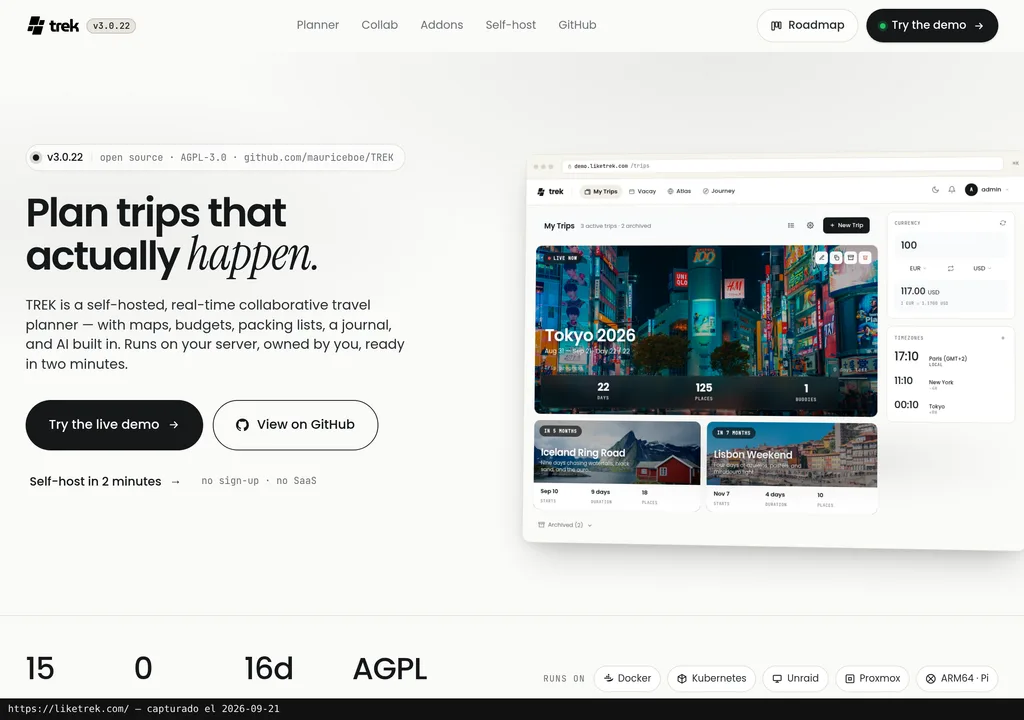
Trek consolidates all of that into a self-hosted web app running on Docker. Drag-and-drop itinerary, live-updating map, multi-currency budget with per-person and per-day breakdowns, assignable packing lists, bookings with confirmation status, and a travel journal. The current version is 3.0.22.
Collaboration runs on WebSocket: everyone edits the same plan simultaneously, no page refreshes, no version conflicts. Per-trip chat, polls ("who's in for Thursday's activity?"), and public read-only links to share the itinerary without requiring anyone to create an account.
It supports 15 languages including right-to-left scripts, and 16-day weather forecasts are built in via Open-Meteo. No API keys required for any of this.
Getting Started
Trek deploys with Docker and, according to its official website, is ready in two minutes. The GitHub repository contains the image and instructions (the official site references the mauriceboe/TREK namespace, which may redirect to the same repo). It also supports Kubernetes, Unraid, Proxmox, and ARM64 (Raspberry Pi included).
What you don't need to get started: zero API keys. Location search defaults to OpenStreetMap. If you want Google Places, you can connect it, but it's not required. Weather uses Open-Meteo, also key-free.
The public demo at demo.liketrek.com lets you try the interface without installing anything or registering. Enough to decide whether it's worth spinning up your own instance.
What the documentation doesn't clarify is the minimum server requirements: RAM, CPU, storage. If you're planning to run it for a 10-person team with long trips, test locally first before committing to a VPS.
Copy this and paste it into Claude Code, Cursor, or your favorite coding assistant:
Clone the Trek repository from https://github.com/liketrek/trek, spin up the environment with Docker Compose, and create a test trip with three days, five activities, and a budget in euros. Confirm that collaboration works by opening two browser tabs.
A coding assistant can guide you through installation, configuration, and testing, but you'll still need a server and enough Docker knowledge to check that everything works.
Using It in Real Marketing
Trek is not a marketing tool. That needs to be said upfront. But any agency that organizes team trips, shoots, trade shows, or client events knows what it's like to have the travel budget scattered across three email threads and a spreadsheet nobody keeps updated.
Where it fits is internal logistics. A team trip with 8 people, three days, flights, hotel, and activities: the per-person, per-day budget breakdown solves "how much do you owe me" without a spreadsheet. The assigned packing list ("you bring the tripod, you bring the editing laptop") cuts out 40 group messages. And the real-time editable itinerary means decisions get made where you can see the options, not in a side chat.
The public read-only link also has its uses: share an event plan with a client without forcing them to create an account or install anything.
The bulk of the value will likely land with small, technical teams, startups, boutique studios, production companies, rather than corporate marketing departments, where the self-hosting requirement is an automatic "no" from IT.
What They Do Not Tell You
The real barrier to entry is Docker. "Two minutes" assumes you already have a server with Docker installed and are comfortable with the terminal. For someone without a technical background, that deployment is two evenings and a YouTube tutorial searched at midnight.
The official website identifies the license as AGPL-3.0. Before basing a deployment or commercial product on Trek, review the license text; this review does not determine the obligations for your particular case.
The website advertises "AI built in" without explaining what the assistant does, which model it uses, or whether it requires a third-party API to function. Until the documentation clarifies this or someone tests and documents it, it's a marketing promise without verifiable backing. When a tool leads with AI on the homepage but doesn't document it, the result usually disappoints.
And with no confirmed native mobile app, the phone experience depends on the browser. Fine for checking the plan. For editing an itinerary on the fly at the airport, good luck.
What People Say
The searches retained for this review did not verify independent opinions about the travel planner. Results about bicycles and Star Trek were excluded because they refer to different products. Without verified usage reports, this review cannot assess deployments beyond the official documentation and demo.
Alternatives
The two direct alternatives the project itself identifies are Wanderlog and TripIt.
Wanderlog is SaaS with free and paid tiers (check their website for current details). You don't self-host anything, you don't need Docker or a server. For non-technical teams, the barrier to entry is zero.
TripIt specializes in parsing booking confirmation emails to build your itinerary automatically. It works well for frequent business travelers, but it's miles away from the open-source, data-ownership concept Trek is built around.
If self-hosting with your data on your server is what you're after, Trek is the option. If you'd rather never touch a terminal, Wanderlog covers the essentials without the friction.
Verdict
On paper, Trek covers the technical basics: open source, self-hosted, real-time collaboration, and no API keys required for the core features. Those claims come from the official documentation and public demo, not an independent deployment test.
The question is who it's for. If you have a VPS, Docker, and feel at home in a terminal, Trek is a serious alternative to the SaaS players in this space. Your data stays on your machine. If "Docker" sounds like a clothing brand to you, this is not your starting point.
The built-in AI remains to be proven. Without documentation on what it does or which model it uses, it's a footnote, not a buying argument. And the community, for now, is uncharted territory. Whoever tries it and reports back will set the benchmark.