Google has rolled out Video Campaign Groups in Google Ads as a generally available feature. It's a new layer that bundles several YouTube video campaigns under a shared reach and frequency objective. The idea: stop your own campaigns from competing against each other for the same audience while you burn through budget without realizing it. It's exactly what paid media managers have been asking for years. And it delivers. But as always with Google, you need to read the fine print.

TL;DR: The no-fluff summary
- Real coordination: groups video campaigns under a single reach and frequency objective. Cross-saturation, gone.
- Google's claim: 2.7 exposures/week = 19% ROI lift, based on 600 US brands (Meridian study, Google's own model).
- Who needs it: advertisers running 5+ active video campaigns with overlapping audiences. Managing a single campaign? This isn't for you.
What problem do Video Campaign Groups solve?
Video Campaign Groups let you coordinate reach and frequency across multiple YouTube video campaigns from a single shared objective, eliminating cross-audience saturation.
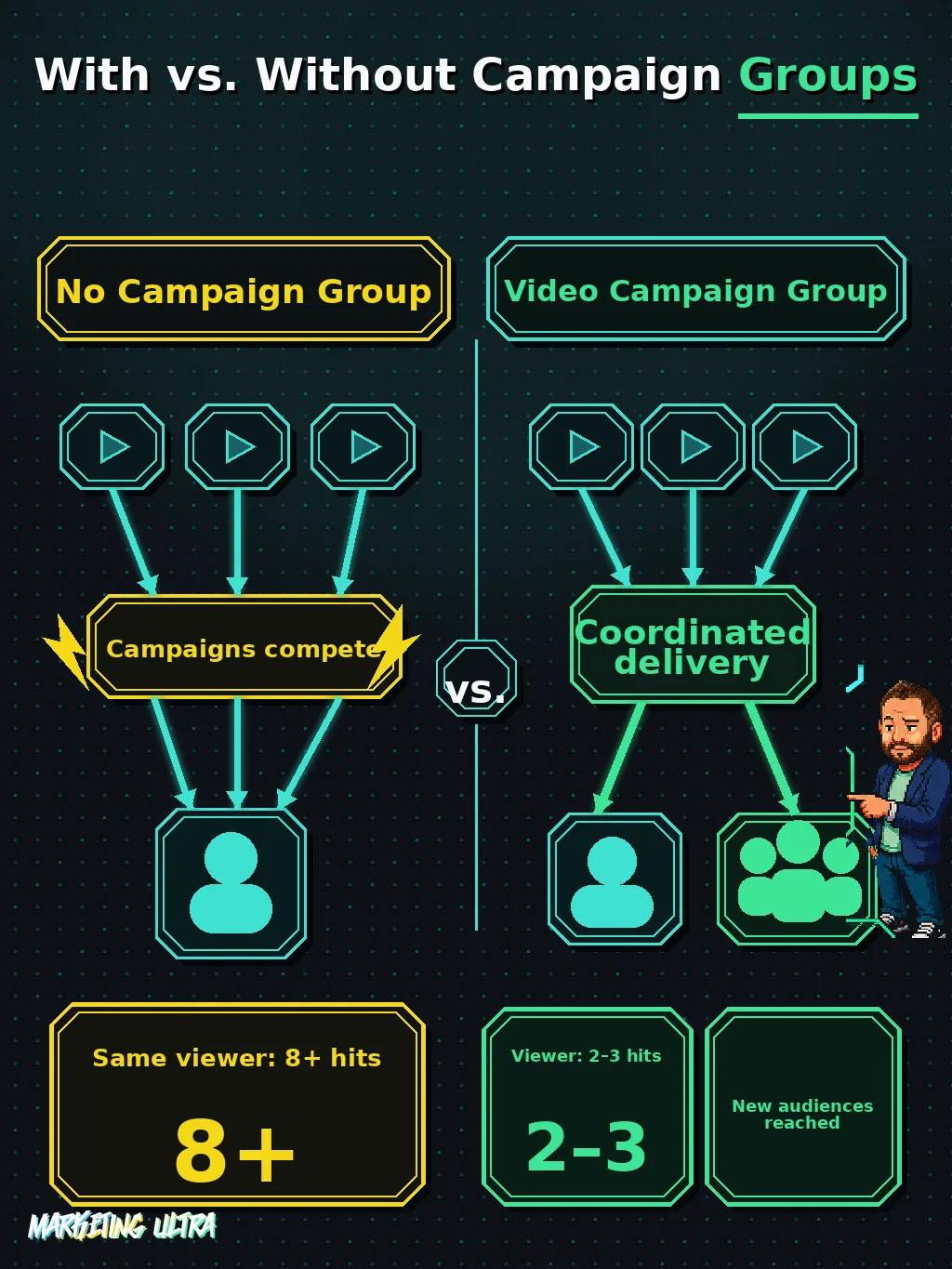
Until now, every video campaign in Google Ads managed its own reach in isolation. If you had three campaigns targeting overlapping audiences, and they almost always overlap, the same user could see your ad six, eight, ten times. You paying for every impression. The user tuning you out completely.
The result: you burn budget hitting the same viewer repeatedly while failing to reach new people. A classic problem that used to be "solved" by manually cross-referencing reports and hoping the numbers added up.
Video Campaign Groups, according to Google's official announcement, treat multiple campaigns as a coordinated effort. You set a shared objective and the system distributes impressions without hammering the same viewer over and over.
How to set up Video Campaign Groups in Google Ads
The workflow is straightforward: you create a Video Campaign Group from the "Campaign Groups" menu in Google Ads, add the video campaigns you want to coordinate, and define a unified reach or frequency objective.
Here's the interesting part: each individual campaign keeps its own budgets, bids, and creatives. You don't lose granular control. What changes is the layer above, Google coordinates delivery across campaigns to prevent the same user from receiving too many hits.
You also get unified reports on unique reach and average weekly impressions at the group level. In day-to-day agency work, that means no more manually cross-referencing data to figure out whether you're saturating the same viewer.
If you're running multiple video campaigns for a brand, as I cover in the complete Google Ads guide, frequency coordination was one of those blind spots you had to patch by hand. There's now a native tool for it.
The 2.7 frequency figure: a number worth questioning
Google cites a study from its own marketing mix model (Meridian), drawing on data from 600 US brands between 2023 and 2025: a frequency of 2.7 exposures per week correlates with a 19% increase in ROI.
That sounds compelling. And this is where I stop.
2.7 times per week means Google is telling you to show your ad almost 3 times to every user, every week. For a large advertiser with broad audiences, that's a lot of inventory. A lot of spend. And the study comes from Meridian, a tool Google owns, with data Google controls.
I'm not saying the figure is wrong. I'm saying that when the company selling you impressions tells you how many you should buy, the number deserves scrutiny. I'd wager that optimal frequency varies wildly depending on the sector, the creative, and where in the funnel you're playing. A universal magic number doesn't exist.
Using 2.7 as a starting benchmark is reasonable. Treating it as gospel is letting Google set your budget for you. And in paid media, that has never been a good idea.
Which advertisers actually need Video Campaign Groups?
Video Campaign Groups deliver real value if you're running multiple video campaigns with overlapping audiences and an awareness budget big enough to justify it.

When does cross-saturation actually become a problem? When you're operating at a certain scale:
- You have 5 or more active video campaigns running simultaneously.
- Several of them target audience segments that overlap.
- You're using different formats (bumpers, in-stream, Shorts) for the same brand.
- Your monthly video budget makes it worth optimizing every impression.
If you're running a single video campaign on €500 a month, this is a Ferrari on a dirt road. But for large brands or agencies with multi-format video strategies, where measuring branded content performance on YouTube was already a challenge, Video Campaign Groups fill a gap that's been sitting there too long.
Availability (Spain/EU: unconfirmed)
Google is billing this as a global launch, but the official source does not specify whether Spain or EEA countries are included. As of today, there is no confirmation that this feature is available to Spanish or European advertisers. You'll need to wait for Google to clarify or check your own account directly.
Video Campaign Groups are a tool that should have existed years ago. They solve a real problem and the implementation is clean. You don't sacrifice granular control over individual campaigns.
But don't lose sight of who built this and why. Google never hands you something without making sure it's profitable for them first. Having a native tool to coordinate frequency is a genuine improvement. Being told the optimal frequency is nearly 3 weekly hits, based on Google's own study, is a different conversation entirely.
Keep that in mind.
Frequently asked questions about Video Campaign Groups
What is Meridian, Google's marketing mix model?
Meridian is Google's marketing mix modeling (MMM) tool. It measures the incremental impact of each advertising channel using aggregated data, spend, impressions, sales, rather than click-based attribution. It's the model Google used to calculate the 2.7 weekly exposure frequency and the 19% ROI increase cited in the Video Campaign Groups announcement.
Do Video Campaign Groups replace per-campaign frequency caps?
No. Each campaign within the group keeps its own budget, bid, and creative settings. Video Campaign Groups add an upper coordination layer that manages frequency across all campaigns in the group, they don't remove or replace controls at the individual campaign level.