Every time Google launches a Core Update, half the industry reacts like a building during a fire drill: those who know the ropes take the stairs; everyone else jumps out the window. Threads of "I've been penalized" flood every feed, emergency audits spin up overnight, and nobody stops to look at the actual data. Diagnosing whether a Core Update has genuinely hit you requires Search Console, GA4, and a method that doesn't run on panic.

TL;DR: The no-nonsense summary
- A Core Update recalibrates the competition: Google measures your content against everything else and decides who rises and who falls.
- Wait a week after the rollout ends: Search Console data during a rollout is pure noise. Analyze after it settles.
- Drill down by page and query: aggregate numbers ("I dropped 15%") tell you nothing useful without context.
- GA4 confirms the business impact: if rankings drop but conversions hold, you're looking at a different diagnosis altogether.
What Is a Google Core Update and Why Isn't It a Penalty?
A Google Core Update is a broad change to Google's ranking systems, rolled out several times a year. It doesn't target specific sites: according to Google's own documentation, the goal is to reassess how all indexed content is evaluated, in order to surface more useful and reliable results.
If your traffic drops after a Core Update, drop the word "penalty" from your vocabulary. Google has recalibrated the competition and other content has moved above yours. That's all it is.
The distinction matters. And it changes everything you should do next.
The May 2026 Core Update rolled out on May 21 and completed on June 2. If you're reading this, you already have clean data to work with. One thing to keep in mind: a few weeks later, the June 2026 Spam Update landed, and that's a different beast entirely. Confusing the two is the first diagnostic mistake. More common than you'd think.
How to Audit the Impact in Search Console Step by Step
Google recommends waiting at least a week after a Core Update finishes before drawing conclusions from Search Console data. Rankings are volatile during the rollout, and any reading taken during that window is noise. Once you have stable data, the process has six steps.
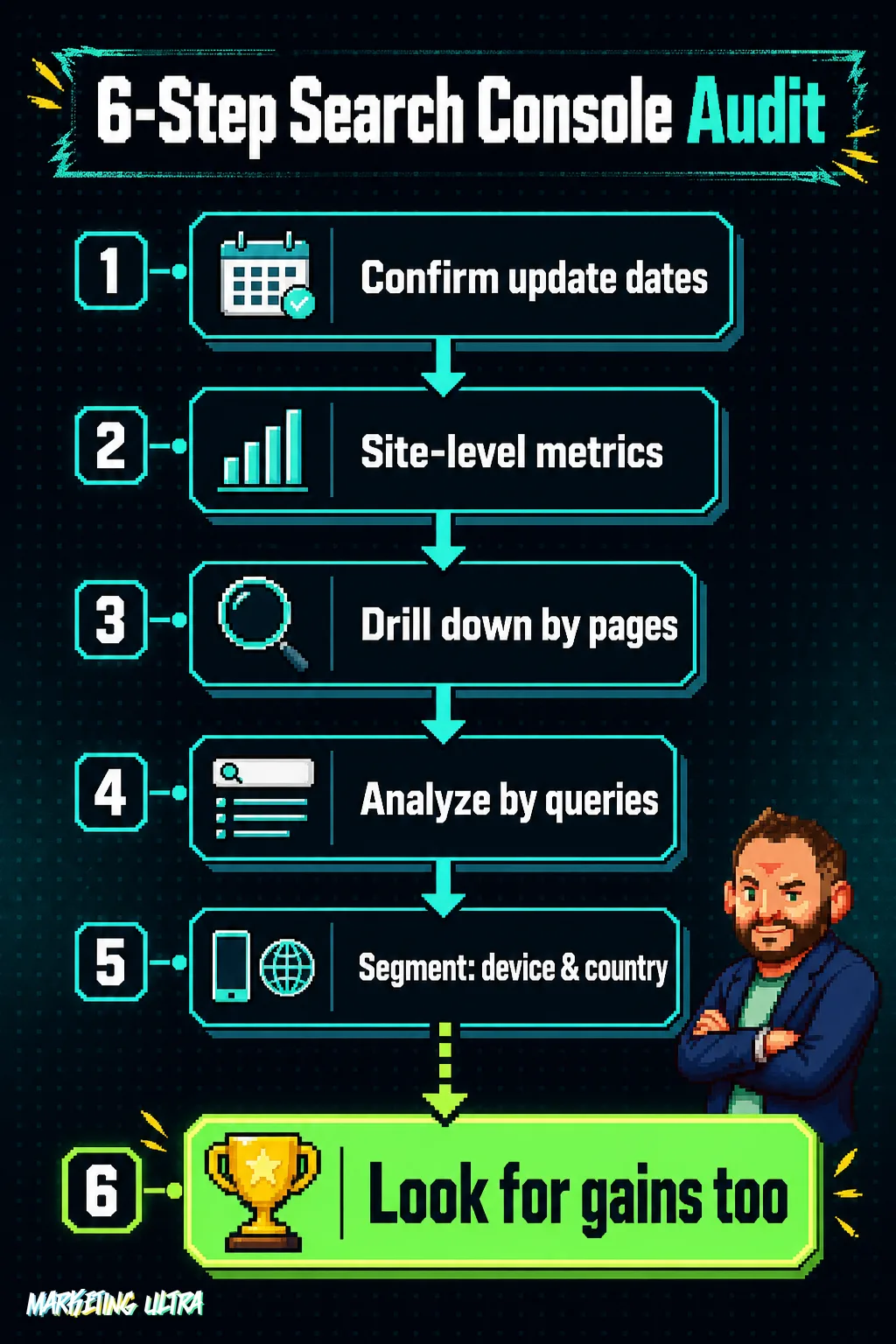
First: confirm the exact start and end dates in the Google Search Status Dashboard. Without those dates, you can't define comparison windows. For the May 2026 update: compare the week of May 14-20 (before) against June 3-9 (after).
Second: in Performance > Search results, review clicks, impressions, CTR, and average position at the site level. If you see a drop, don't stop there. The aggregate number is just the entry point.
Third: drill down by pages. Filter the URLs in your content cluster and compare them individually. Did they all drop equally, or just some? The pattern matters more than the headline number.
Fourth: analyze by queries. Sort by position change and pay close attention to long-tail queries with informational intent. These are the most sensitive to quality shifts: if they drop, Google has found content it considers more useful than yours for those specific searches.
Fifth: segment by device and country. Sometimes the impact is asymmetric, you lose on mobile but not desktop, or the other way around.
And sixth (the step almost no one takes): look for queries where you've actually gained positions. Not every Core Update is bad news. Sometimes Google recalibrates and rewards you in one vertical while trimming you in another.
What to Look for in GA4 After a Core Update
GA4 won't tell you why Google moved you, but it will confirm whether the move has actually hurt the business. And that's what matters when decisions need to be made.
In Acquisition > Traffic acquisition, filter by organic and apply the same comparison windows. Look at sessions, users, engagement rate, and conversions. If positions dropped in Search Console but conversions held steady, the pages you lost probably weren't your converters. That's already a different diagnosis.
In Engagement > Pages and screens, cross-reference the affected URLs with behavioral metrics: average engagement time, scroll depth, bounce rate. If users land and leave immediately, you have a content problem, not just a rankings problem. And that one does need action.
One data point few people check: organic's role in assisted conversions. An informational page may not convert directly, but it can be the first touchpoint between a user and your brand. Lose it, and you don't just lose traffic, you lose the top of the funnel.
The Diagnosis Most People Skip
You have the data. You know which pages and queries moved. Now what?

First: look at what content replaced yours. Search those queries in an incognito tab and see who's occupying your old position. Is their content sharper, more current? Does it show genuine first-hand experience? The answer usually stings. But it's the only one that actually helps.
Second: apply the E-E-A-T lens honestly. Experience, expertise, authority, trust. Does your content show that you actually know what you're talking about, or is it a well-formatted repackaging of what was already out there? Google doesn't penalize AI-generated text: it penalizes content that offers nothing the next result over doesn't already have. As I explain in my analysis on agentic search and the new SEO game, content with a genuine point of view and original data is what Google, and AI-powered engines, will increasingly reward.
Sites that build authority consistently are the ones that weather every Core Update. Always. At Marketing Ultra we've grown in organic visibility across the last five consecutive Core Updates, not the other way around. That's not luck: it's because every piece tries to bring something that isn't already in the top ten results. If your diagnosis lands on "my content was correct but generic," there's your answer.
Third (and this matters): don't act in a rush. Google explicitly states there is nothing to "fix" after a Core Update, because it isn't a penalty. Recovery comes from investing in quality over the medium term, not from patching meta tags on a Friday afternoon. Sites that lose organic traffic on a sustained basis rarely recover by tweaking titles: they recover by rethinking what they actually offer.
A Core Update is a reassessment, not an earthquake. Google recalibrates and your content gets measured against everything else. If you add value, you rise. If you don't, you fall.
Search Console tells you what happened; GA4 tells you how much it hurt the business. The why doesn't come from any tool, it comes from being honest about your own content. The diagnosis was never the hard part. The hard part is accepting what you find.
Frequently Asked Questions About Google Core Updates
How long does a site take to recover after a Core Update?
There's no fixed timeline. Google indicates that recovery typically comes with the next Core Update (every 2-4 months), provided you've invested in improving content quality. Tactical patches, changing a title, rewriting a meta description, rarely work: what Google reassesses is the overall usefulness of your content versus the competition.
Is a Core Update the same as a manual penalty?
No. A manual action is applied by a human Google reviewer for guideline violations and appears as an explicit notification in your Search Console account. A Core Update is algorithmic, automatic, and generates no notification: it recalibrates how Google values all indexed content. If you don't have a manual action notification in Search Console, you haven't been penalized.